
Furniture Background Removal Challenges and Professional Solutions


High-quality furniture photography is essential for attracting customers in today's competitive eCommerce market. Whether you're selling furniture on Amazon, Shopify, Etsy, eBay, Wayfair, or your own online store, product images are often the deciding factor in a customer's purchasing decision.
Unlike smaller products, furniture items are large, detailed, and come in various shapes and materials. Sofas, chairs, tables, cabinets, beds, and office furniture often feature curved edges, carved wood, transparent glass, reflective metal, or intricate upholstery. These details make background removal significantly more challenging than editing standard product images.
Many businesses rely on AI-powered tools for quick editing, but automatic background removal often struggles with complex furniture designs. Professional manual editing ensures clean edges, accurate cutouts, and realistic results that enhance customer confidence.
In this guide, we'll explore the most common furniture background removal challenges and explain how professional editing solves them.
A clean background helps customers focus entirely on the product.
Professional background removal helps:
Clean, consistent product images make your online store look more professional and trustworthy.
Furniture rarely has simple outlines.
Examples include:
These complex shapes make automatic background removal inaccurate.
Professional editors use Manual Clipping Path and Image Masking to achieve precise cutouts.
Many furniture pieces feature detailed craftsmanship such as:
AI often removes or damages these fine details.
Manual editing preserves every decorative element while removing the unwanted background.
Furniture often includes:
Transparent surfaces confuse automatic editing tools.
Professional Image Masking preserves transparency while removing the background accurately.
Furniture made from stainless steel, chrome, or polished aluminum reflects its surroundings.
Common issues include:
Professional retouching removes unwanted reflections while preserving the natural metallic finish.
Furniture made from fabric includes:
Improper editing may remove important texture and stitching details.
Professional editors carefully preserve fabric texture while creating clean edges.
Removing the original background often removes natural shadows as well.
Without shadows, furniture appears to float unnaturally.
Create realistic:
These shadows add depth while maintaining a clean product presentation.
Furniture images are often captured in high resolution for zoom functionality.
Large files require careful editing to maintain quality without slowing website performance.
Professional optimization balances image quality with faster loading speeds.
Furniture photography often suffers from:
Professional editors adjust brightness, contrast, and exposure while preserving natural colors.
Wood finishes, upholstery, and painted surfaces must appear accurate.
Poor editing can make:
Professional Color Correction maintains true-to-life colors.
Different backgrounds, shadows, and lighting make product catalogs look unprofessional.
Use a consistent editing style across every furniture image.
Although AI tools have improved, furniture remains one of the hardest product categories to edit automatically.
Common AI problems include:
Professional manual editing provides far greater accuracy and consistency.
Professional editors typically perform:
These services ensure furniture images are clean, realistic, and ready for eCommerce.
Choosing the right background enhances the overall presentation.
Popular options include:
For most online marketplaces, white backgrounds are recommended because they keep the focus on the product.
Professional editing helps businesses:
High-quality furniture images help customers make informed buying decisions.
Professional furniture editing is widely used by:
Professional images help brands compete effectively in the furniture market.
At ImageWorld24, we provide professional Furniture Background Removal Services for furniture brands, photographers, manufacturers, and eCommerce businesses worldwide.
Our services include:
Every image is manually edited by experienced Photoshop professionals to preserve intricate details, maintain accurate colors, create realistic shadows, and deliver premium-quality results.
Furniture background removal is far more complex than editing ordinary product photos. Intricate carvings, transparent glass, reflective surfaces, upholstery textures, and natural shadows all require careful manual editing to achieve professional results.
By investing in professional Furniture Background Removal Services, businesses can create clean, realistic, and visually appealing product images that build customer trust and improve online sales.
Whether you're selling on Amazon, Shopify, Etsy, eBay, Wayfair, or your own website, professionally edited furniture images help your products stand out, strengthen your brand, and create a better shopping experience for customers.

How to Make Product Images Look Premium Premium product images help businesses build trust, attract more customers, and increase online sales. Whether you're selling on Amazon, Shopify, Etsy, eBay, or your own eCommerce website, professional image editing can transform ordinary product photos into luxury-quality visuals. In this guide, you'll learn the best techniques to make product images look premium and stand out in today's competitive online marketplace.

Food Product Image Editing Tips for Better eCommerce Sales High-quality food photography is one of the most effective ways to attract customers and increase online sales. However, poor editing can make food look dull, unappetizing, and unrealistic. In this guide, you'll discover professional food product image editing tips that help restaurants, food brands, grocery stores, and eCommerce businesses create mouth-watering product images that convert visitors into customers.
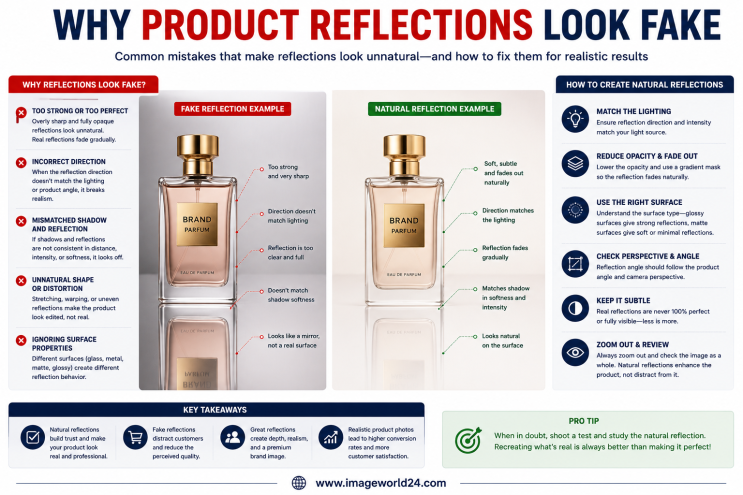
Why Product Reflections Look Fake (And How to Fix Them) Product reflection effects can make product photos look premium, but when done incorrectly, they often appear artificial and reduce customer trust. In this guide, you'll learn why product reflections look fake, the most common reflection editing mistakes, and how professional Photoshop retouching creates natural, realistic reflections for high-quality eCommerce product images.
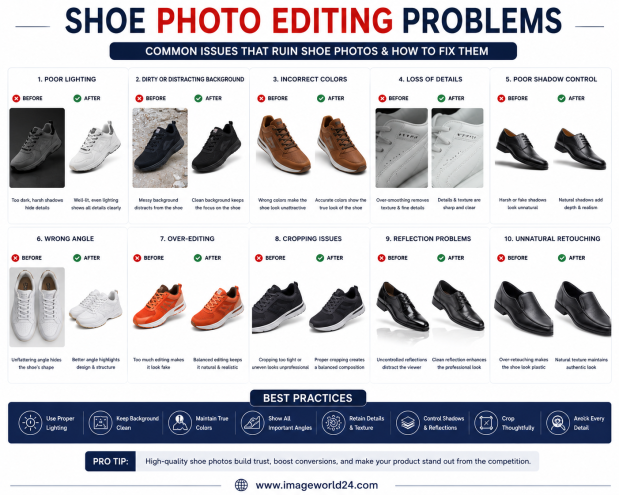
Shoe Photo Editing Problems and How to Fix Them Professional shoe photography is essential for attracting customers and increasing online sales. However, poor editing can make even premium footwear look dull, unrealistic, or low quality. In this guide, we'll explain the most common shoe photo editing problems and how professional Photoshop editing helps create clean, realistic, and high-converting product images for eCommerce.
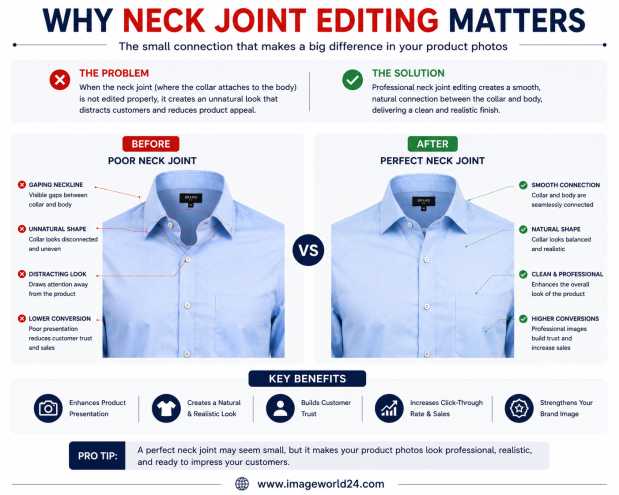
Why Neck Joint Editing Matters for Clothing Product Images Neck Joint Editing is a vital part of Ghost Mannequin photo editing that gives clothing products a realistic, three-dimensional appearance. Without proper neck joint editing, garments can look incomplete, hollow, and unprofessional. Learn why Neck Joint Editing is essential for fashion eCommerce and how it helps improve customer trust and online sales.
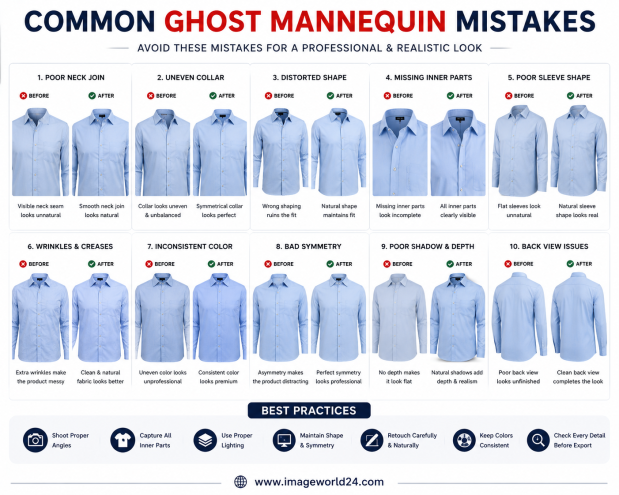
Common Ghost Mannequin Mistakes and How to Avoid Them Ghost Mannequin Editing is a popular technique used in fashion eCommerce to create clean, professional clothing images. However, poor editing can make garments look distorted, unrealistic, or unprofessional. In this guide, we'll discuss the most common Ghost Mannequin mistakes and explain how professional editing helps create flawless, marketplace-ready apparel images.

ImageWorld24 provides high-quality stock images, professional photo editing, custom visuals, and creative media solutions to help businesses and creators grow with premium visual content.
Call: +8801920933383
Mail: workimageworld24@gmail.com
Location: Dhaka, Bangladesh