
How to Make Product Images Look Premium

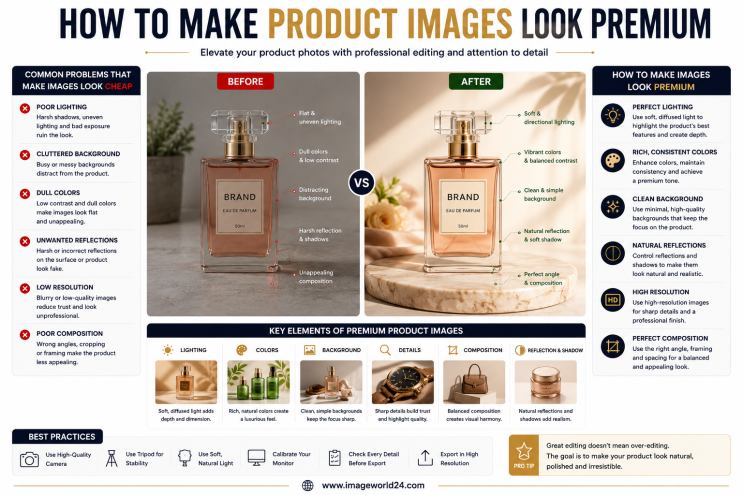
Customers associate image quality with product quality.
Premium product images help you:
Professional visuals make customers feel more confident about purchasing your products.
A cluttered background distracts customers from the product.
The most popular options include:
A clean background ensures the product remains the center of attention.
Use Manual Clipping Path and Background Removal for perfectly clean edges.
Color accuracy is one of the most important aspects of product photography.
Poor color correction can make:
Professional Color Correction ensures customers receive products that match the images.
Uneven lighting can make products appear dull or low quality.
Common problems include:
Adjust exposure, highlights, shadows, brightness, and contrast to create balanced lighting.
Products without shadows often look unrealistic.
Professional shadows create depth and realism.
Popular options include:
Choose the shadow style that best matches your product and marketplace requirements.
Even new products may contain:
These imperfections reduce the premium appearance.
Professional retouching removes distractions while preserving the product's natural texture.
Rough edges immediately reveal poor editing.
Automatic background removal often leaves:
Use Manual Clipping Path and Image Masking for clean, accurate edges.
Over-editing can remove important material details.
Customers want to see:
Enhance clarity while maintaining the product's authentic appearance.
Consistency makes your online store look more professional.
Ensure every image has:
A consistent catalog strengthens your brand identity.
High-resolution images allow customers to zoom in and inspect product details.
However, extremely large files can slow down your website.
Optimize images to balance quality and loading speed, improving both user experience and SEO.
Premium brands rarely rely on automatic editing tools.
Professional Photoshop editing includes:
Manual editing delivers cleaner, more realistic results than AI alone.
AI editing tools are useful for basic tasks but often struggle with:
Common AI mistakes include:
Professional manual editing ensures every detail is refined with precision.
Professional editors typically provide:
These services work together to produce premium-quality product images.
Professional editing is ideal for:
Every product benefits from clean, high-quality visuals.
Professionally edited images help businesses:
Premium visuals create a better shopping experience and encourage repeat customers.
At ImageWorld24, we specialize in professional Product Image Editing Services for eCommerce businesses, photographers, brands, and online retailers worldwide.
Our services include:
Every image is manually edited by experienced Photoshop professionals to ensure accurate colors, clean edges, realistic shadows, and a premium finish that meets the standards of modern eCommerce marketplaces.
Creating premium product images is about much more than applying filters or increasing brightness. It requires careful attention to detail, accurate color correction, realistic shadows, clean background removal, and professional retouching.
Customers naturally trust brands that present their products with high-quality visuals. Whether you're selling on Amazon, Shopify, Etsy, eBay, Walmart, or your own website, premium product images can improve your brand image, increase conversions, reduce returns, and help you compete more effectively in today's crowded eCommerce market.
Investing in professional product image editing is an investment in your brand's credibility and long-term success.
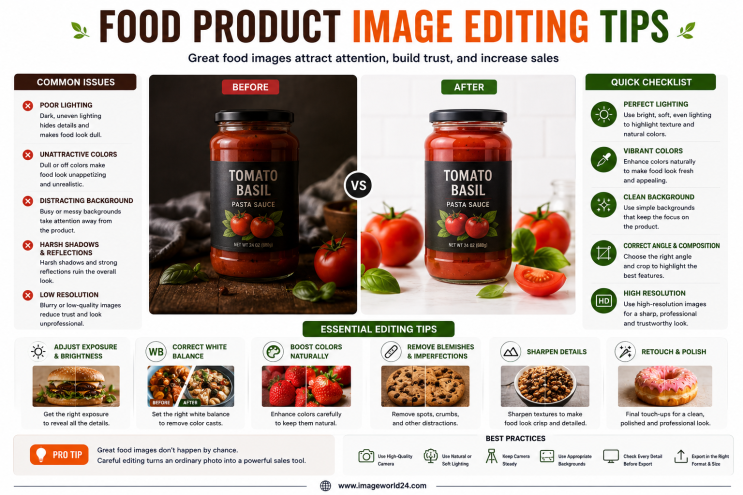
Food Product Image Editing Tips for Better eCommerce Sales High-quality food photography is one of the most effective ways to attract customers and increase online sales. However, poor editing can make food look dull, unappetizing, and unrealistic. In this guide, you'll discover professional food product image editing tips that help restaurants, food brands, grocery stores, and eCommerce businesses create mouth-watering product images that convert visitors into customers.
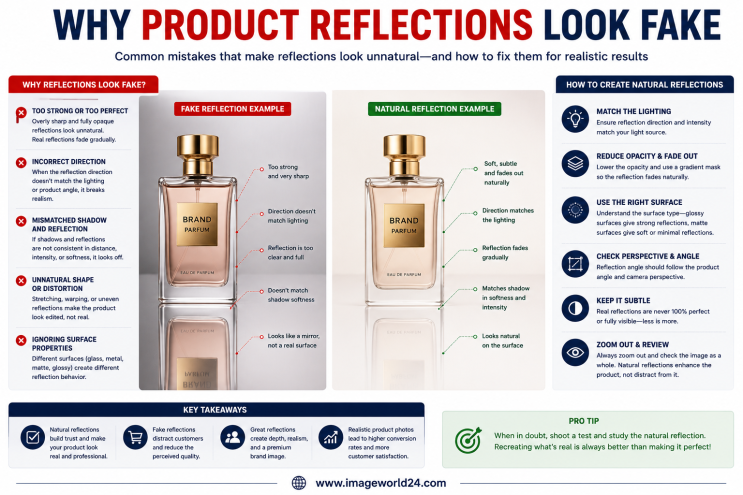
Why Product Reflections Look Fake (And How to Fix Them) Product reflection effects can make product photos look premium, but when done incorrectly, they often appear artificial and reduce customer trust. In this guide, you'll learn why product reflections look fake, the most common reflection editing mistakes, and how professional Photoshop retouching creates natural, realistic reflections for high-quality eCommerce product images.

Furniture Background Removal Challenges and Professional Solutions Furniture photography requires precise background removal to showcase products professionally. However, large sizes, intricate edges, shadows, reflections, and complex designs make furniture one of the most difficult product categories to edit. Learn about the biggest furniture background removal challenges and how professional Photoshop editing creates clean, realistic, and marketplace-ready images.
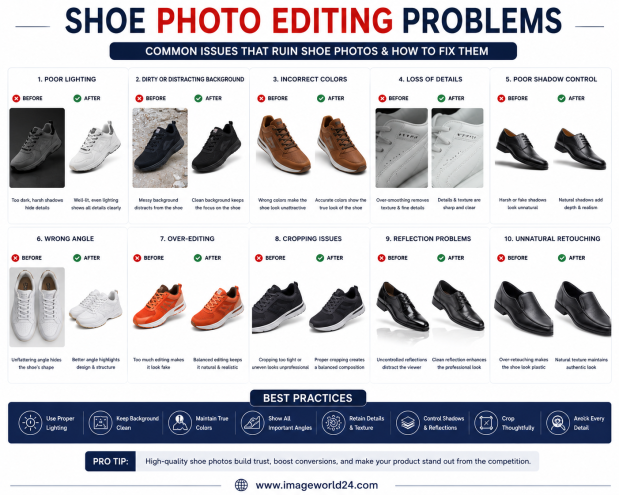
Shoe Photo Editing Problems and How to Fix Them Professional shoe photography is essential for attracting customers and increasing online sales. However, poor editing can make even premium footwear look dull, unrealistic, or low quality. In this guide, we'll explain the most common shoe photo editing problems and how professional Photoshop editing helps create clean, realistic, and high-converting product images for eCommerce.
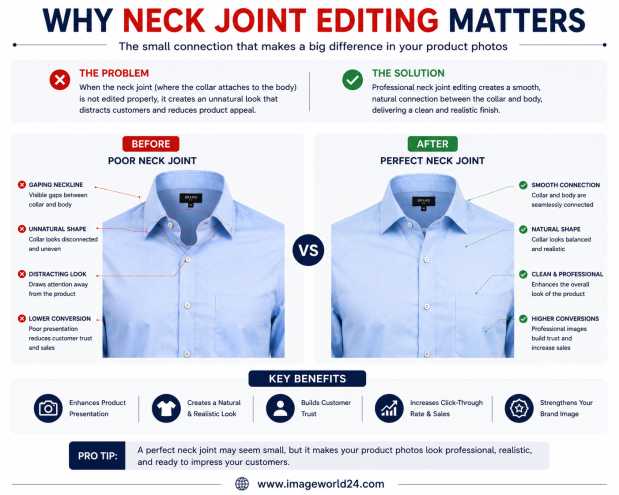
Why Neck Joint Editing Matters for Clothing Product Images Neck Joint Editing is a vital part of Ghost Mannequin photo editing that gives clothing products a realistic, three-dimensional appearance. Without proper neck joint editing, garments can look incomplete, hollow, and unprofessional. Learn why Neck Joint Editing is essential for fashion eCommerce and how it helps improve customer trust and online sales.
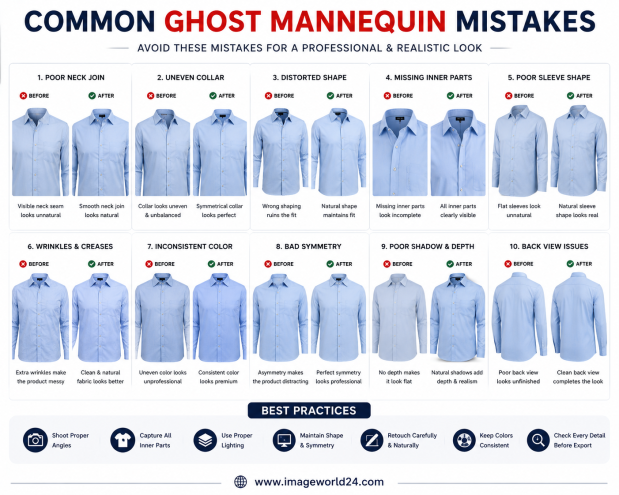
Common Ghost Mannequin Mistakes and How to Avoid Them Ghost Mannequin Editing is a popular technique used in fashion eCommerce to create clean, professional clothing images. However, poor editing can make garments look distorted, unrealistic, or unprofessional. In this guide, we'll discuss the most common Ghost Mannequin mistakes and explain how professional editing helps create flawless, marketplace-ready apparel images.

ImageWorld24 provides high-quality stock images, professional photo editing, custom visuals, and creative media solutions to help businesses and creators grow with premium visual content.
Call: +8801920933383
Mail: workimageworld24@gmail.com
Location: Dhaka, Bangladesh