
Why Product Reflections Look Fake (And How to Fix Them)

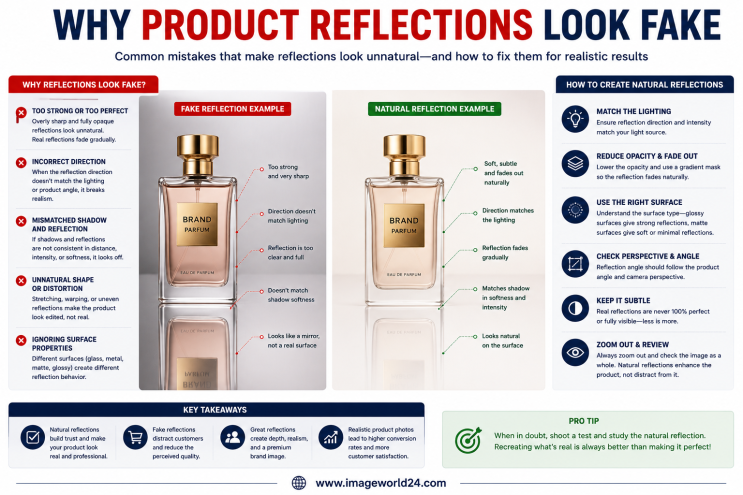
In professional product photography, reflections can add elegance, depth, and a premium appearance to product images. Many luxury brands use subtle reflection effects to make products stand out in advertisements, catalogs, and eCommerce stores.
However, creating realistic reflections is more challenging than simply duplicating an image and lowering its opacity. Poorly edited reflections often look fake, making products appear unprofessional and reducing customer confidence.
Whether you're selling on Amazon, Shopify, Etsy, eBay, Walmart, or your own online store, realistic product reflections can improve product presentation, while unrealistic reflections can have the opposite effect.
In this guide, we'll explain why product reflections look fake and how professional Photoshop editing creates clean, natural, and realistic reflection effects.
A well-designed reflection can:
When reflections are natural, customers focus on the product. When they're fake, the editing becomes the distraction.
One of the biggest mistakes is using a reflection that's almost as dark as the original product.
Real reflections are always softer and lighter.
Reduce the opacity gradually so the reflection fades naturally.
A perfect mirror copy rarely exists in real-life product photography.
Sharp reflections immediately look artificial.
Apply a subtle blur while maintaining enough detail to keep the reflection realistic.
Many editors simply flip the product vertically without considering perspective.
This creates an unrealistic reflection.
Adjust the reflection angle based on the product's position and camera perspective.
Real reflections gradually disappear as they move away from the object.
Many beginners leave the reflection fully visible from top to bottom.
Use a smooth gradient mask to create a natural fade.
If the product lighting and reflection brightness don't match, the image feels unnatural.
Balance brightness, contrast, and highlights so both elements work together naturally.
Some reflections extend far beyond what would occur naturally.
This makes the product appear to float.
Keep the reflection proportional to the product and the simulated surface.
Different surfaces produce different reflection styles.
Examples include:
Using the wrong reflection style makes the image unrealistic.
Create reflections that match the intended surface material.
Sometimes one side of the reflection appears darker than the other.
This creates an obvious editing mistake.
Maintain consistent opacity and smooth transitions across the entire reflection.
Reflection alone cannot replace a realistic shadow.
Without shadows, products often appear to float.
Combine Reflection Shadow with a subtle Natural Shadow for maximum realism.
Reflections should blend naturally with the background.
Visible cut lines or harsh edges immediately reveal poor editing.
Carefully blend the reflection into the background using professional masking techniques.
AI-powered editing tools can generate reflections quickly, but they often lack realism.
Common AI mistakes include:
Professional manual editing produces far more convincing results.
Professional editors typically use:
These techniques ensure reflections look natural instead of digitally generated.
Reflection effects work especially well for:
Subtle reflections help premium products appear more elegant and sophisticated.
Professional reflection editing helps businesses:
Well-executed reflections enhance product appeal without distracting from the product itself.
At ImageWorld24, we specialize in creating realistic Reflection Shadow Services for eCommerce businesses, photographers, advertising agencies, and product brands worldwide.
Our services include:
Every image is manually edited by experienced Photoshop professionals to ensure natural reflections, accurate lighting, clean edges, and premium-quality results.
Product reflections can significantly improve the visual appeal of your product images—but only when they're done correctly. Overly dark reflections, incorrect angles, harsh edges, missing fade effects, or unrealistic lighting can make even premium products appear poorly edited.
Professional reflection editing focuses on subtlety and realism. By carefully controlling opacity, perspective, shadows, and lighting, experienced editors create reflection effects that enhance the product without drawing attention to the editing itself.
Whether you're selling on Amazon, Shopify, Etsy, eBay, Walmart, or your own eCommerce website, investing in professional Reflection Shadow Editing Services helps your products look more premium, builds customer trust, and improves your chances of increasing online sales.

How to Make Product Images Look Premium Premium product images help businesses build trust, attract more customers, and increase online sales. Whether you're selling on Amazon, Shopify, Etsy, eBay, or your own eCommerce website, professional image editing can transform ordinary product photos into luxury-quality visuals. In this guide, you'll learn the best techniques to make product images look premium and stand out in today's competitive online marketplace.

Food Product Image Editing Tips for Better eCommerce Sales High-quality food photography is one of the most effective ways to attract customers and increase online sales. However, poor editing can make food look dull, unappetizing, and unrealistic. In this guide, you'll discover professional food product image editing tips that help restaurants, food brands, grocery stores, and eCommerce businesses create mouth-watering product images that convert visitors into customers.

Furniture Background Removal Challenges and Professional Solutions Furniture photography requires precise background removal to showcase products professionally. However, large sizes, intricate edges, shadows, reflections, and complex designs make furniture one of the most difficult product categories to edit. Learn about the biggest furniture background removal challenges and how professional Photoshop editing creates clean, realistic, and marketplace-ready images.
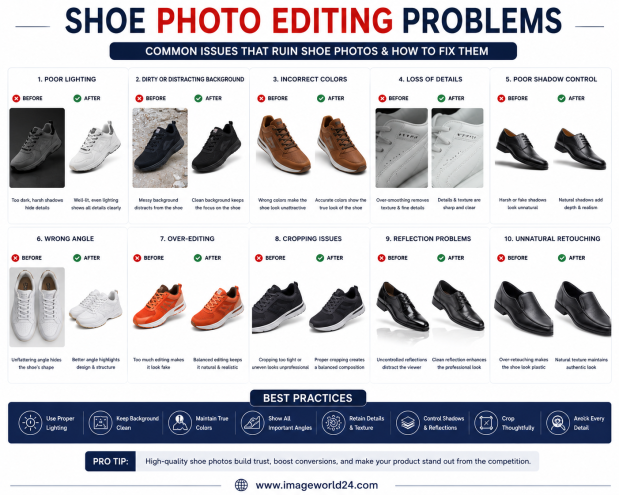
Shoe Photo Editing Problems and How to Fix Them Professional shoe photography is essential for attracting customers and increasing online sales. However, poor editing can make even premium footwear look dull, unrealistic, or low quality. In this guide, we'll explain the most common shoe photo editing problems and how professional Photoshop editing helps create clean, realistic, and high-converting product images for eCommerce.
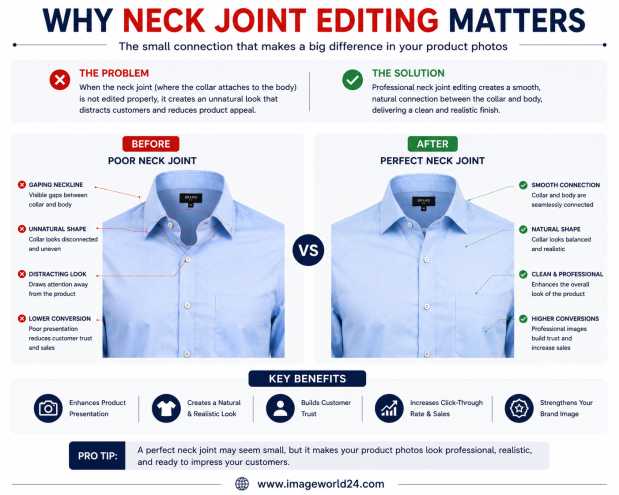
Why Neck Joint Editing Matters for Clothing Product Images Neck Joint Editing is a vital part of Ghost Mannequin photo editing that gives clothing products a realistic, three-dimensional appearance. Without proper neck joint editing, garments can look incomplete, hollow, and unprofessional. Learn why Neck Joint Editing is essential for fashion eCommerce and how it helps improve customer trust and online sales.
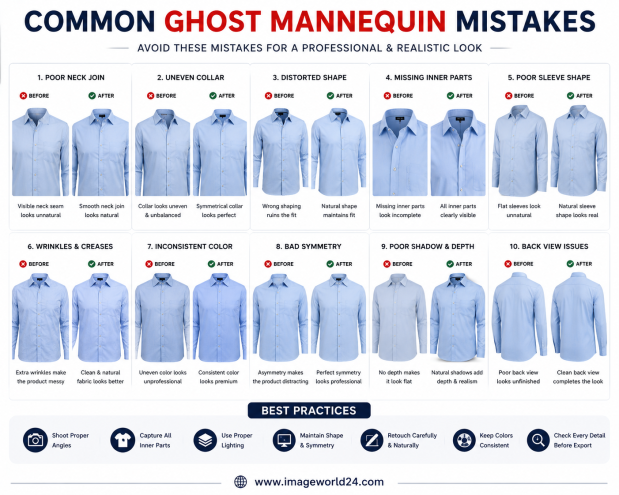
Common Ghost Mannequin Mistakes and How to Avoid Them Ghost Mannequin Editing is a popular technique used in fashion eCommerce to create clean, professional clothing images. However, poor editing can make garments look distorted, unrealistic, or unprofessional. In this guide, we'll discuss the most common Ghost Mannequin mistakes and explain how professional editing helps create flawless, marketplace-ready apparel images.

ImageWorld24 provides high-quality stock images, professional photo editing, custom visuals, and creative media solutions to help businesses and creators grow with premium visual content.
Call: +8801920933383
Mail: workimageworld24@gmail.com
Location: Dhaka, Bangladesh