
Common Background Removal Mistakes Businesses Make


Product images are often the first thing customers notice when shopping online. A clean, professionally edited image can instantly build trust, while poor editing can make even a high-quality product appear unprofessional.
Many businesses try to save time or money by using automatic background removal tools or inexperienced editors. Unfortunately, this often results in poor-quality images that hurt brand reputation and reduce sales.
At ImageWorld24, we specialize in professional manual background removal to ensure every product image looks clean, natural, and ready for eCommerce. In this article, we'll explore the most common background removal mistakes and explain how to avoid them.
Background removal is more than simply deleting a background. It helps create professional product images that:
When done incorrectly, the opposite happens.
One of the most common mistakes is leaving rough, uneven, or pixelated edges around the product.
This usually happens when automatic selection tools are used without proper refinement.
Manual clipping paths and edge refinement create smooth, natural, and accurate outlines.
Small pieces of the original background often remain around the product after poor editing.
These unwanted artifacts become even more noticeable on white backgrounds or when images are enlarged.
Experienced editors carefully inspect every edge to remove all unwanted background elements.
Automatic AI tools sometimes remove parts of the actual product, especially around:
Missing details can make products look damaged or incomplete.
Manual editing preserves every important detail while maintaining clean edges.
Completely removing shadows can make products appear like they're floating.
Natural shadows add depth and realism to product images.
Professional editors recreate realistic drop shadows, reflection shadows, or natural shadows for a polished appearance.
AI background removal tools are fast, but they aren't always accurate.
They often struggle with:
Professional editing combines manual precision with advanced Photoshop techniques to achieve the best results.
Using different editing styles across your product catalog creates an inconsistent and unprofessional appearance.
Customers appreciate a clean and uniform shopping experience.
Maintain the same editing style, background color, shadow effects, and image dimensions across all product photos.
Some editing processes unintentionally change product colors.
Incorrect colors can lead to disappointed customers and increased product returns.
Professional editors preserve accurate colors while making subtle adjustments to brightness, contrast, and exposure.
Reducing image quality during editing can make products appear blurry or pixelated.
High-resolution images are essential for zoom features and professional product listings.
Always export images in high resolution while maintaining sharp details.
Many businesses upload product images that don't meet marketplace requirements.
For example, Amazon typically requires a pure white background for the main product image.
Non-compliant images may reduce visibility or require revisions.
Professional editors prepare images according to the requirements of Amazon, Shopify, Etsy, eBay, and other marketplaces.
Low-cost editing services may seem attractive, but poor-quality work often leads to:
Professional editing is an investment that delivers long-term value through better product presentation.
Manual background removal offers:
This level of quality is difficult to achieve with fully automated tools.
At ImageWorld24, every image is manually edited by experienced Photoshop professionals.
Our services include:
We help businesses create clean, high-quality product images that enhance brand image and improve online sales.
Background removal is a critical part of professional product photography. Small editing mistakes can have a significant impact on customer trust, brand perception, and conversion rates.
By avoiding common background removal mistakes and choosing experienced professionals, businesses can present their products with confidence and create a stronger visual identity.
If you're looking for accurate, high-quality background removal services, ImageWorld24 is ready to help you achieve flawless product images.

How to Make Product Images Look Premium Premium product images help businesses build trust, attract more customers, and increase online sales. Whether you're selling on Amazon, Shopify, Etsy, eBay, or your own eCommerce website, professional image editing can transform ordinary product photos into luxury-quality visuals. In this guide, you'll learn the best techniques to make product images look premium and stand out in today's competitive online marketplace.

Food Product Image Editing Tips for Better eCommerce Sales High-quality food photography is one of the most effective ways to attract customers and increase online sales. However, poor editing can make food look dull, unappetizing, and unrealistic. In this guide, you'll discover professional food product image editing tips that help restaurants, food brands, grocery stores, and eCommerce businesses create mouth-watering product images that convert visitors into customers.
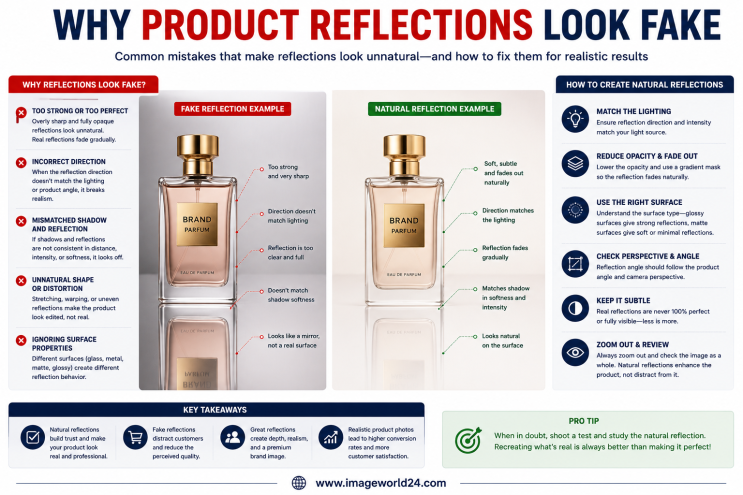
Why Product Reflections Look Fake (And How to Fix Them) Product reflection effects can make product photos look premium, but when done incorrectly, they often appear artificial and reduce customer trust. In this guide, you'll learn why product reflections look fake, the most common reflection editing mistakes, and how professional Photoshop retouching creates natural, realistic reflections for high-quality eCommerce product images.

Furniture Background Removal Challenges and Professional Solutions Furniture photography requires precise background removal to showcase products professionally. However, large sizes, intricate edges, shadows, reflections, and complex designs make furniture one of the most difficult product categories to edit. Learn about the biggest furniture background removal challenges and how professional Photoshop editing creates clean, realistic, and marketplace-ready images.
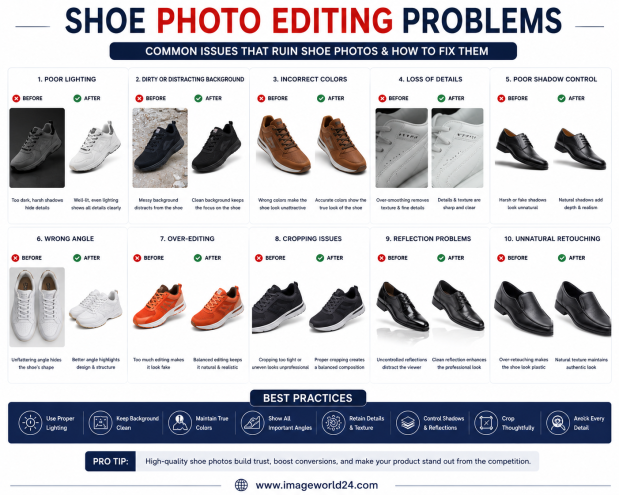
Shoe Photo Editing Problems and How to Fix Them Professional shoe photography is essential for attracting customers and increasing online sales. However, poor editing can make even premium footwear look dull, unrealistic, or low quality. In this guide, we'll explain the most common shoe photo editing problems and how professional Photoshop editing helps create clean, realistic, and high-converting product images for eCommerce.
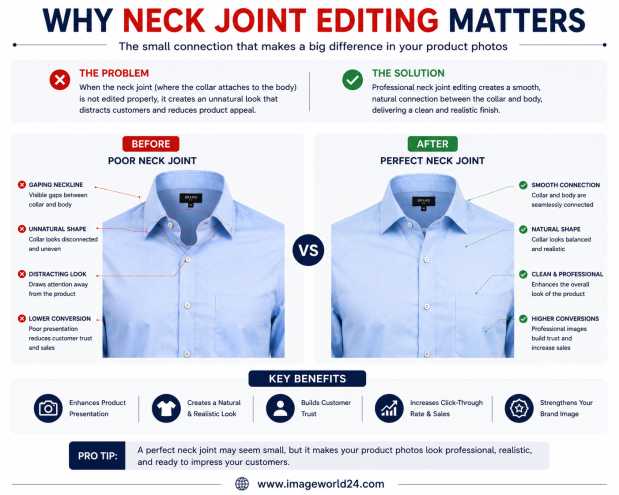
Why Neck Joint Editing Matters for Clothing Product Images Neck Joint Editing is a vital part of Ghost Mannequin photo editing that gives clothing products a realistic, three-dimensional appearance. Without proper neck joint editing, garments can look incomplete, hollow, and unprofessional. Learn why Neck Joint Editing is essential for fashion eCommerce and how it helps improve customer trust and online sales.

ImageWorld24 provides high-quality stock images, professional photo editing, custom visuals, and creative media solutions to help businesses and creators grow with premium visual content.
Call: +8801920933383
Mail: workimageworld24@gmail.com
Location: Dhaka, Bangladesh