
How to Edit Transparent Products Properly

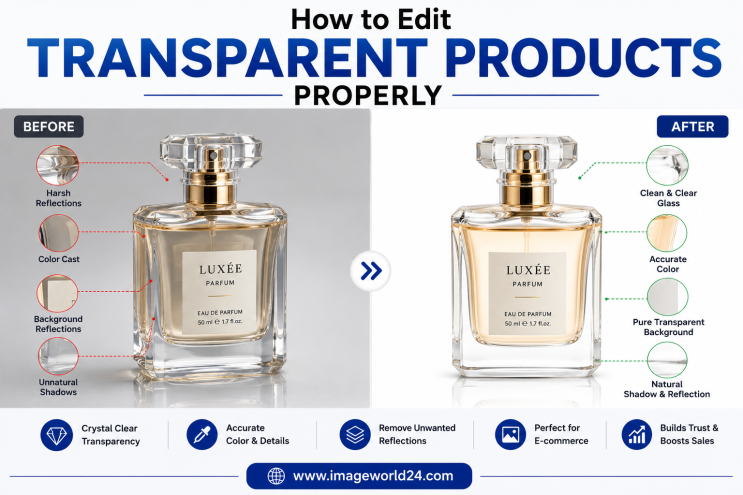
Editing transparent products requires much more precision than editing ordinary product photos. Unlike solid objects, transparent items allow light to pass through them, creating reflections, refractions, highlights, and subtle shadows that define their appearance.
Whether you sell on Amazon, Shopify, Etsy, eBay, Walmart, or your own eCommerce website, professionally edited transparent product images help customers better understand your products while creating a premium shopping experience.
Many beginners rely on AI background removal tools, but these tools often struggle with transparent objects. They remove important details, cut off glass edges, or eliminate reflections that make the product look realistic.
In this guide, you'll learn the common challenges of editing transparent products and discover the professional techniques used by Photoshop experts.
Transparent objects don't have solid edges like shoes or clothing.
Instead, they contain:
These characteristics make automatic editing tools unreliable.
Professional editing is often necessary to preserve the product's true appearance.
Professional editing is commonly used for:
These products require careful handling to maintain realism.
AI tools often mistake transparent areas for the background.
This causes:
Use professional Image Masking instead of relying entirely on AI.
Reflections are part of transparent objects.
Removing them completely makes products look fake.
Keep natural reflections while removing only unwanted distractions.
Professional retouching balances reflections without losing realism.
Many editors accidentally turn transparent glass into a solid white object.
Maintain original transparency while enhancing visibility through careful masking and adjustment.
Transparent products naturally contain internal shadows caused by light passing through the material.
Removing these shadows makes products appear flat.
Preserve internal shadows while cleaning unnecessary imperfections.
Too much editing often makes glass products look artificial.
Professional editing should improve the image—not completely change it.
Image Masking is the preferred technique for transparent objects because it preserves semi-transparent areas.
Unlike Clipping Path, masking allows editors to retain realistic transparency.
Layer Masks allow non-destructive editing while preserving delicate details.
This technique is ideal for:
Professional Color Correction improves:
Without changing the product's true color.
Editors reduce distracting reflections while maintaining natural highlights.
Balanced reflections make products appear clean and premium.
After background removal, realistic shadows help transparent products feel grounded.
Professional editors create:
These shadows enhance realism without overpowering the product.
Many people ask whether Clipping Path or Image Masking is better.
Best for:
Best for:
For transparent products, Image Masking is almost always the better choice.
AI background removal tools often fail because they cannot accurately distinguish between transparent material and the background.
Common AI mistakes include:
Professional Photoshop editors manually refine every detail for superior results.
Professional editing usually combines several services:
These services work together to create clean and realistic product images.
Professional editing offers numerous advantages:
Customers are more likely to purchase when they can clearly see the product without distracting editing mistakes.
Professional transparent product editing is widely used in:
These industries depend on accurate product presentation to build customer confidence.
At ImageWorld24, we specialize in professional Photoshop editing for transparent and reflective products.
Our services include:
Every image is manually edited by experienced Photoshop professionals to ensure that transparency, reflections, and fine details are preserved while delivering clean, professional, and marketplace-ready results.
Transparent products are among the most challenging items to edit because they rely on subtle reflections, light transmission, and delicate edges to appear realistic. Automatic editing tools often remove these important details, resulting in unnatural-looking images.
By using professional Image Masking, careful reflection control, accurate color correction, and realistic shadow creation, you can preserve the natural beauty of transparent products while presenting them in a clean and professional way.
Whether you're selling glass bottles, cosmetics, perfume, acrylic products, or beverage containers, investing in professional transparent product editing helps improve customer trust, enhance your brand image, and increase eCommerce sales.
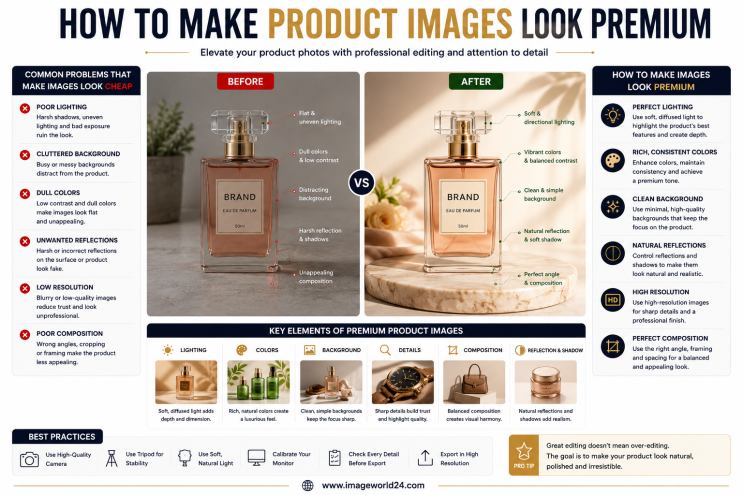
How to Make Product Images Look Premium Premium product images help businesses build trust, attract more customers, and increase online sales. Whether you're selling on Amazon, Shopify, Etsy, eBay, or your own eCommerce website, professional image editing can transform ordinary product photos into luxury-quality visuals. In this guide, you'll learn the best techniques to make product images look premium and stand out in today's competitive online marketplace.
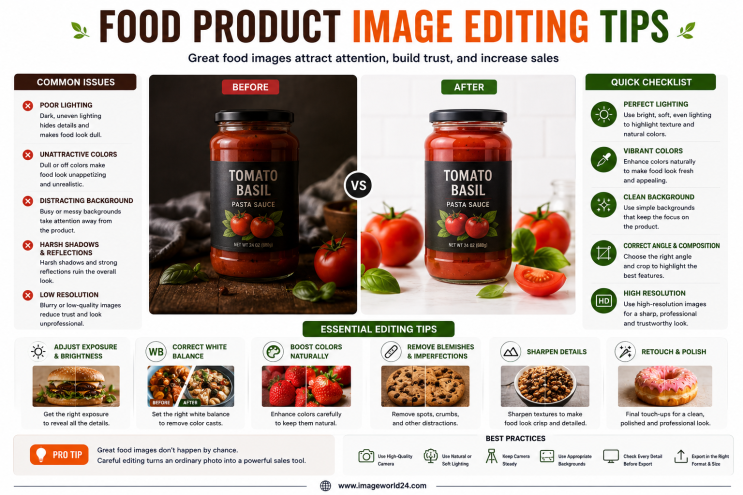
Food Product Image Editing Tips for Better eCommerce Sales High-quality food photography is one of the most effective ways to attract customers and increase online sales. However, poor editing can make food look dull, unappetizing, and unrealistic. In this guide, you'll discover professional food product image editing tips that help restaurants, food brands, grocery stores, and eCommerce businesses create mouth-watering product images that convert visitors into customers.
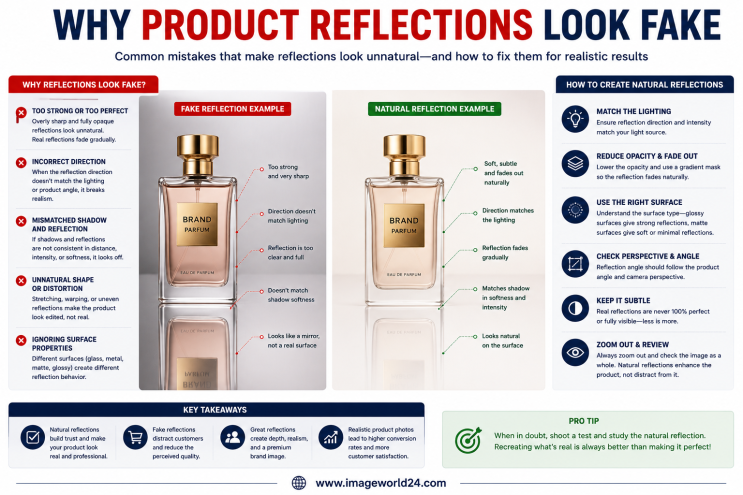
Why Product Reflections Look Fake (And How to Fix Them) Product reflection effects can make product photos look premium, but when done incorrectly, they often appear artificial and reduce customer trust. In this guide, you'll learn why product reflections look fake, the most common reflection editing mistakes, and how professional Photoshop retouching creates natural, realistic reflections for high-quality eCommerce product images.

Furniture Background Removal Challenges and Professional Solutions Furniture photography requires precise background removal to showcase products professionally. However, large sizes, intricate edges, shadows, reflections, and complex designs make furniture one of the most difficult product categories to edit. Learn about the biggest furniture background removal challenges and how professional Photoshop editing creates clean, realistic, and marketplace-ready images.
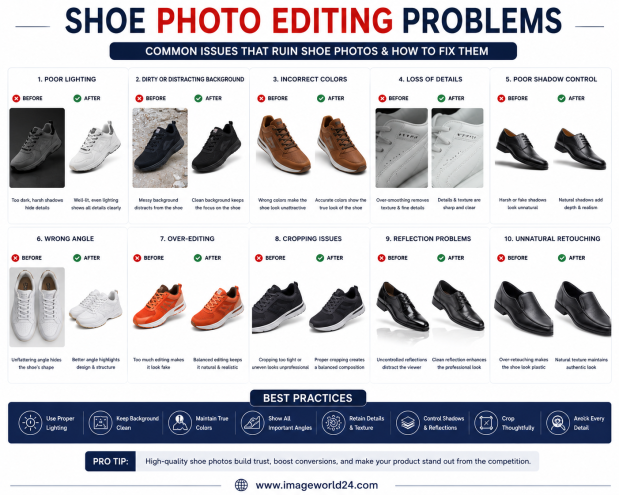
Shoe Photo Editing Problems and How to Fix Them Professional shoe photography is essential for attracting customers and increasing online sales. However, poor editing can make even premium footwear look dull, unrealistic, or low quality. In this guide, we'll explain the most common shoe photo editing problems and how professional Photoshop editing helps create clean, realistic, and high-converting product images for eCommerce.
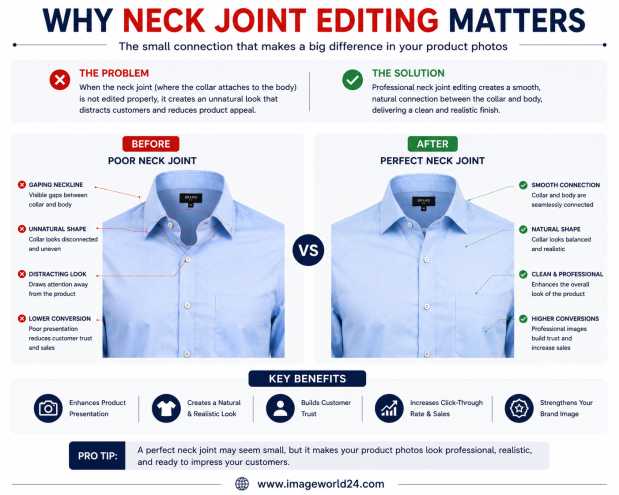
Why Neck Joint Editing Matters for Clothing Product Images Neck Joint Editing is a vital part of Ghost Mannequin photo editing that gives clothing products a realistic, three-dimensional appearance. Without proper neck joint editing, garments can look incomplete, hollow, and unprofessional. Learn why Neck Joint Editing is essential for fashion eCommerce and how it helps improve customer trust and online sales.

ImageWorld24 provides high-quality stock images, professional photo editing, custom visuals, and creative media solutions to help businesses and creators grow with premium visual content.
Call: +8801920933383
Mail: workimageworld24@gmail.com
Location: Dhaka, Bangladesh