
How to Prepare Product Photos Before Sending Them for Editing

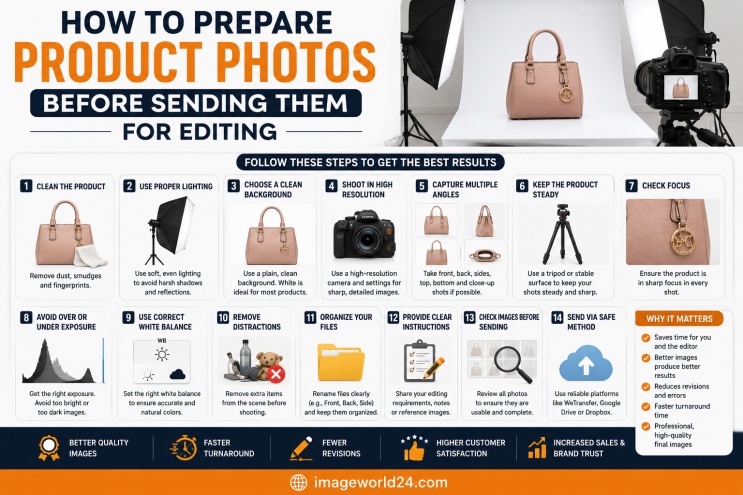
Professional editing enhances an image—but it cannot fully fix a poorly captured photograph.
Well-prepared images help editors:
Simply put, better input leads to better output.
Low-resolution images lose important details during editing.
High-resolution photos give editors more flexibility and produce sharper final results.
Lighting affects color, texture, and detail.
Good lighting reduces the amount of correction needed during editing.
Editors frequently receive products covered with:
Before photographing:
This saves editing time and improves the final appearance.
A clean background makes editing faster and more accurate.
Recommended backgrounds include:
Avoid:
Simple backgrounds help editors create clean cut-outs and professional product images.
Changing settings between products creates inconsistent images.
Maintain consistent:
Consistency is especially important when photographing entire product catalogs.
Customers want to see every important detail.
Photograph:
Providing multiple angles also gives editors more options during the editing process.
Avoid cropping products too tightly.
Editors need extra space to:
Leave a comfortable margin around each product.
RAW files preserve significantly more image information than JPEG files.
Benefits include:
If RAW isn't available, use the highest-quality JPEG setting.
Sending hundreds of randomly named images can slow down the workflow.
Organize images by:
Example:
RunningShoes_Black_Front.jpg
RunningShoes_Black_Back.jpg
RunningShoes_Black_Side.jpg
Well-organized files reduce confusion and speed up production.
Don't assume the editor knows exactly what you want.
Provide clear instructions such as:
Detailed instructions help ensure the final images meet your expectations.
Different marketplaces have different image requirements.
Examples include:
Let your editor know where the images will be used.
Do not apply:
Editors achieve better results using the original image.
Before sending images, confirm that every required angle has been included.
Missing files can delay the editing process.
Create a checklist before uploading your images.
If you're sending many images:
Cloud storage services are ideal for transferring large files.
Take a final look at your files.
Ask yourself:
A quick review can prevent unnecessary revisions.
Many clients accidentally make these mistakes:
Avoiding these issues helps editors deliver faster and better results.
Preparing your photos correctly leads to:
It's a simple step that can make a significant difference.
At ImageWorld24, we provide professional photo editing services for Amazon sellers, Shopify stores, Etsy businesses, photographers, and global eCommerce brands.
Our services include:
Every image is manually edited by experienced Photoshop professionals to ensure accuracy, consistency, and premium quality.
Whether you need a handful of images or a large product catalog, we deliver fast turnaround times and dependable results.
Professional photo editing starts long before the editing process itself. The quality of your original product photos has a direct impact on the final result.
By using proper lighting, capturing high-resolution images, cleaning your products, organizing your files, and providing clear instructions, you help editors produce images that look polished, professional, and ready for eCommerce.
Taking a little extra time to prepare your photos can save hours of revisions and help your products make a stronger impression on potential customers.
RAW files are ideal because they retain the most image data. If RAW isn't available, use high-quality JPEG files.
No. Send the original images unless your editor specifically requests otherwise. Original files provide the most flexibility.
Minor sharpness improvements are possible, but severely blurry or low-resolution images cannot be fully restored. Capturing a sharp photo is always the best option.
Organize them into clearly labeled folders, compress them into ZIP files if necessary, and include detailed editing instructions.
RAW files contain more color, exposure, and detail information, allowing editors to produce higher-quality results than heavily compressed image formats.

How to Make Product Images Look Premium Premium product images help businesses build trust, attract more customers, and increase online sales. Whether you're selling on Amazon, Shopify, Etsy, eBay, or your own eCommerce website, professional image editing can transform ordinary product photos into luxury-quality visuals. In this guide, you'll learn the best techniques to make product images look premium and stand out in today's competitive online marketplace.
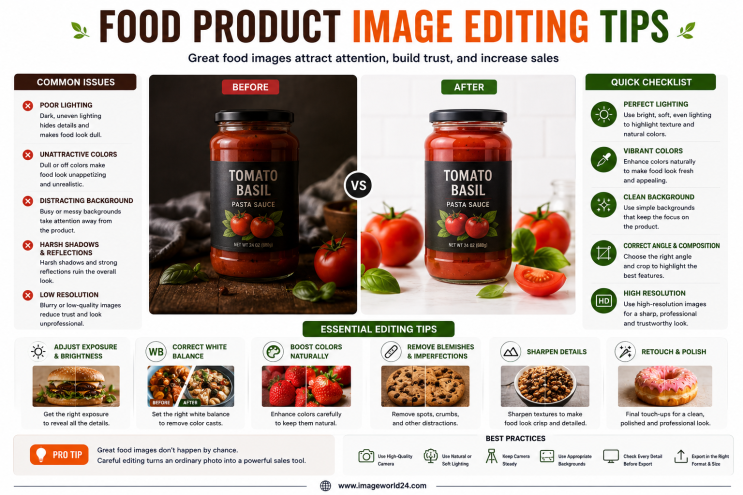
Food Product Image Editing Tips for Better eCommerce Sales High-quality food photography is one of the most effective ways to attract customers and increase online sales. However, poor editing can make food look dull, unappetizing, and unrealistic. In this guide, you'll discover professional food product image editing tips that help restaurants, food brands, grocery stores, and eCommerce businesses create mouth-watering product images that convert visitors into customers.
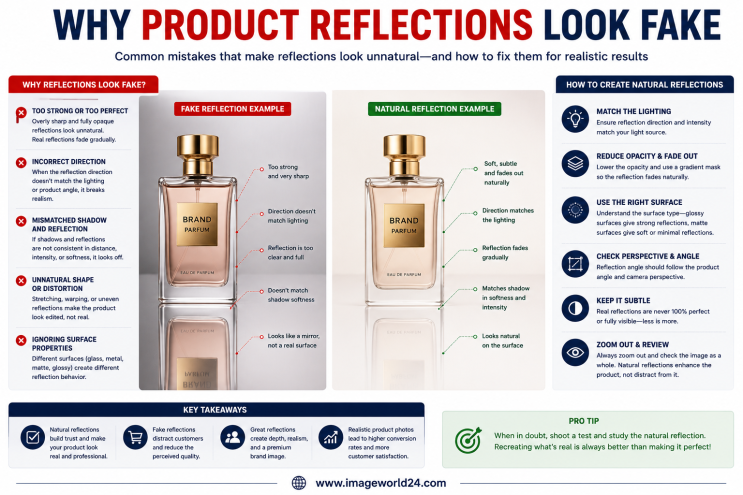
Why Product Reflections Look Fake (And How to Fix Them) Product reflection effects can make product photos look premium, but when done incorrectly, they often appear artificial and reduce customer trust. In this guide, you'll learn why product reflections look fake, the most common reflection editing mistakes, and how professional Photoshop retouching creates natural, realistic reflections for high-quality eCommerce product images.

Furniture Background Removal Challenges and Professional Solutions Furniture photography requires precise background removal to showcase products professionally. However, large sizes, intricate edges, shadows, reflections, and complex designs make furniture one of the most difficult product categories to edit. Learn about the biggest furniture background removal challenges and how professional Photoshop editing creates clean, realistic, and marketplace-ready images.
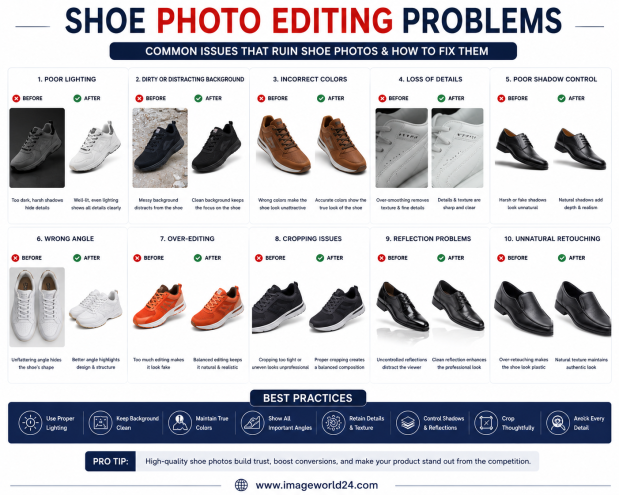
Shoe Photo Editing Problems and How to Fix Them Professional shoe photography is essential for attracting customers and increasing online sales. However, poor editing can make even premium footwear look dull, unrealistic, or low quality. In this guide, we'll explain the most common shoe photo editing problems and how professional Photoshop editing helps create clean, realistic, and high-converting product images for eCommerce.
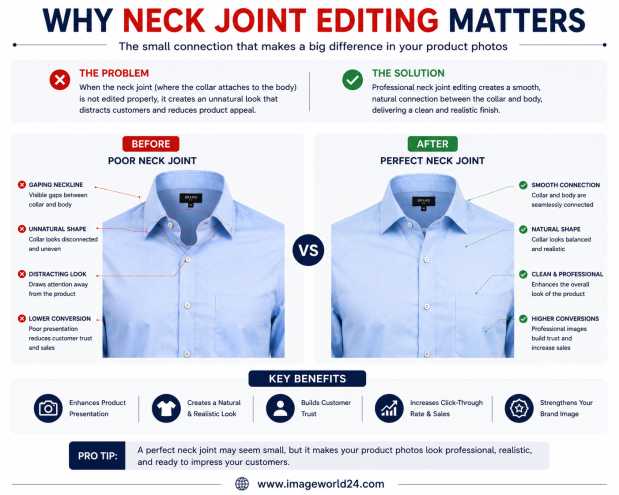
Why Neck Joint Editing Matters for Clothing Product Images Neck Joint Editing is a vital part of Ghost Mannequin photo editing that gives clothing products a realistic, three-dimensional appearance. Without proper neck joint editing, garments can look incomplete, hollow, and unprofessional. Learn why Neck Joint Editing is essential for fashion eCommerce and how it helps improve customer trust and online sales.

ImageWorld24 provides high-quality stock images, professional photo editing, custom visuals, and creative media solutions to help businesses and creators grow with premium visual content.
Call: +8801920933383
Mail: workimageworld24@gmail.com
Location: Dhaka, Bangladesh