
How to Remove Background from Glass Products

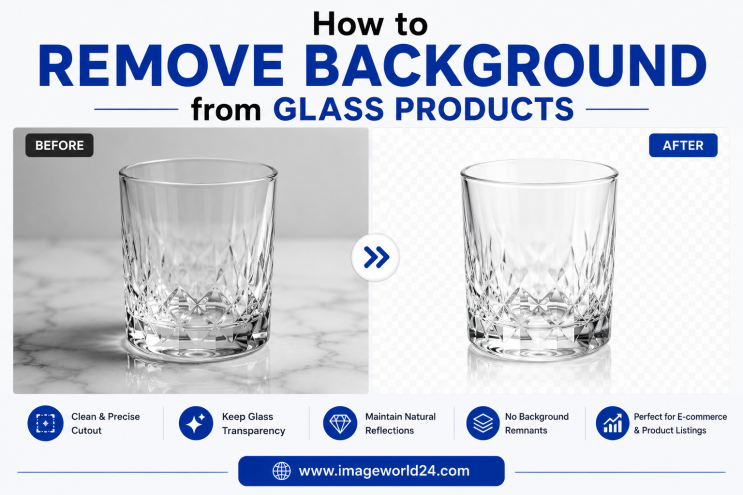
Glass products are widely used in industries such as cosmetics, beverages, home décor, pharmaceuticals, and luxury packaging. Whether you're selling on Amazon, Shopify, Etsy, eBay, Walmart, or your own eCommerce website, professionally edited glass product images help attract customers and build trust.
Unlike solid objects, glass is transparent and reflects light from its surroundings. Because of this, removing the background requires much more than simply selecting the object and deleting the background.
Many beginners rely on AI background removal tools, but these tools often fail to preserve transparency, reflections, and subtle edges. The result is an unrealistic product image that can reduce customer confidence.
This article explains how professionals remove backgrounds from glass products while maintaining a realistic and high-quality appearance.
Glass behaves differently from most materials because it allows light to pass through it.
A glass object contains:
These characteristics make background removal much more complex than editing products like shoes, clothing, or electronics.
Professional background removal is commonly used for:
These products require precise editing to preserve their natural appearance.
AI tools often mistake transparent areas for the background.
This results in:
Use Image Masking combined with manual Photoshop editing instead of relying entirely on automatic tools.
Reflections are essential for making glass look realistic.
Removing every reflection causes the product to appear flat.
Keep natural highlights while removing only distracting reflections or unwanted glare.
One of the biggest editing mistakes is turning transparent glass into a solid white object.
Professional editors preserve the original transparency while cleaning the background.
Glass often contains subtle internal reflections and shadows.
Removing these details makes the product look fake.
Maintain the natural light passing through the glass while improving clarity.
Poor editing often leaves visible white edges around glass products.
These halos become very noticeable on colored or dark backgrounds.
Professional editors manually clean edges using Photoshop to create smooth and natural transitions.
Image Masking is the preferred technique for transparent objects because it preserves transparency and delicate edges.
It is ideal for:
Layer Masks allow non-destructive editing, making it easier to refine transparent areas without damaging the image.
For complex glass images, Channel Masking helps isolate fine transparent details while maintaining realism.
Professional editors manually refine every edge to ensure:
Many people assume that Clipping Path works for every product.
However, Clipping Path is designed for products with hard, well-defined edges.
Glass products require Image Masking, because masking preserves semi-transparent areas that clipping paths cannot accurately reproduce.
In many projects, professionals use both techniques together:
This combination delivers the best results.
AI background removal tools work well for simple objects but often fail with transparent materials.
Common AI problems include:
Professional Photoshop editors manually correct these issues for a clean and realistic appearance.
Background removal is only one part of professional glass product editing.
Editors also perform:
These adjustments create polished, marketplace-ready product images.
After removing the background, realistic shadows help maintain a natural appearance.
Professional editors commonly add:
Creates a realistic grounded look.
Perfect for Amazon, Shopify, Etsy, and eCommerce product listings.
Ideal for luxury products such as perfume bottles, cosmetics, and premium packaging.
Choosing the right shadow style enhances both realism and visual appeal.
Professional editing helps businesses:
Customers are more likely to purchase when product images accurately represent the real item.
Professional glass editing is widely used in:
These industries rely on accurate product images to attract customers and maintain brand quality.
At ImageWorld24, we specialize in professional image editing for glass and transparent products.
Our services include:
Every image is edited manually by experienced Photoshop professionals to preserve transparency, reflections, and fine details while delivering clean, high-quality, marketplace-ready images.
Removing the background from glass products is one of the most demanding tasks in product photo editing. Transparent surfaces, reflections, and delicate edges require careful handling that AI tools often cannot provide.
By using professional Image Masking, manual edge refinement, color correction, and realistic shadow creation, you can produce high-quality glass product images that look natural and professional.
Whether you're selling perfume bottles, cosmetic containers, glassware, or decorative items, investing in professional glass product editing helps improve customer trust, strengthen your brand, and increase eCommerce sales.
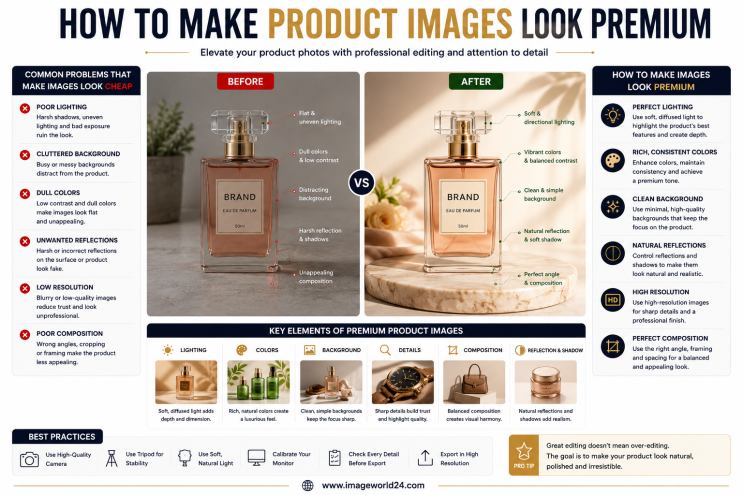
How to Make Product Images Look Premium Premium product images help businesses build trust, attract more customers, and increase online sales. Whether you're selling on Amazon, Shopify, Etsy, eBay, or your own eCommerce website, professional image editing can transform ordinary product photos into luxury-quality visuals. In this guide, you'll learn the best techniques to make product images look premium and stand out in today's competitive online marketplace.
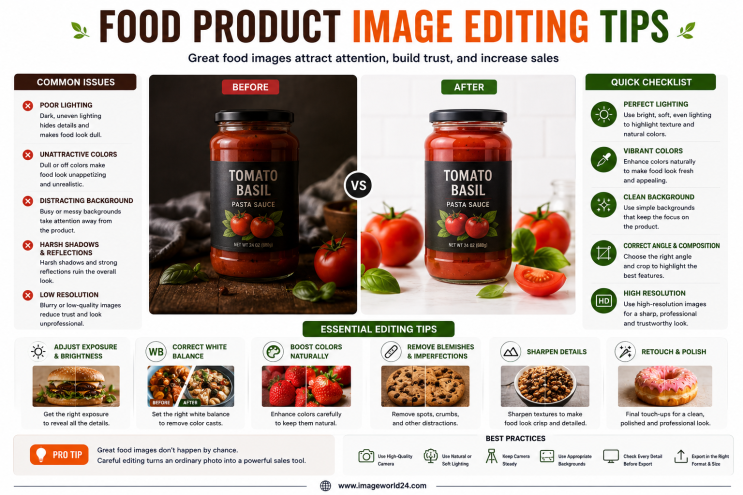
Food Product Image Editing Tips for Better eCommerce Sales High-quality food photography is one of the most effective ways to attract customers and increase online sales. However, poor editing can make food look dull, unappetizing, and unrealistic. In this guide, you'll discover professional food product image editing tips that help restaurants, food brands, grocery stores, and eCommerce businesses create mouth-watering product images that convert visitors into customers.
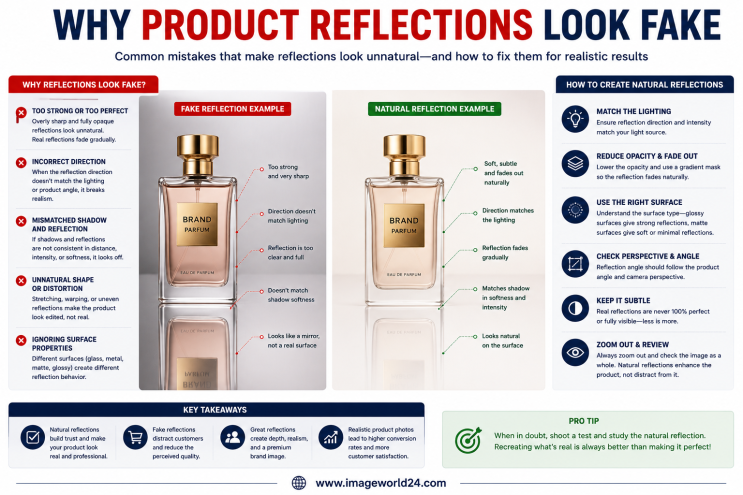
Why Product Reflections Look Fake (And How to Fix Them) Product reflection effects can make product photos look premium, but when done incorrectly, they often appear artificial and reduce customer trust. In this guide, you'll learn why product reflections look fake, the most common reflection editing mistakes, and how professional Photoshop retouching creates natural, realistic reflections for high-quality eCommerce product images.

Furniture Background Removal Challenges and Professional Solutions Furniture photography requires precise background removal to showcase products professionally. However, large sizes, intricate edges, shadows, reflections, and complex designs make furniture one of the most difficult product categories to edit. Learn about the biggest furniture background removal challenges and how professional Photoshop editing creates clean, realistic, and marketplace-ready images.
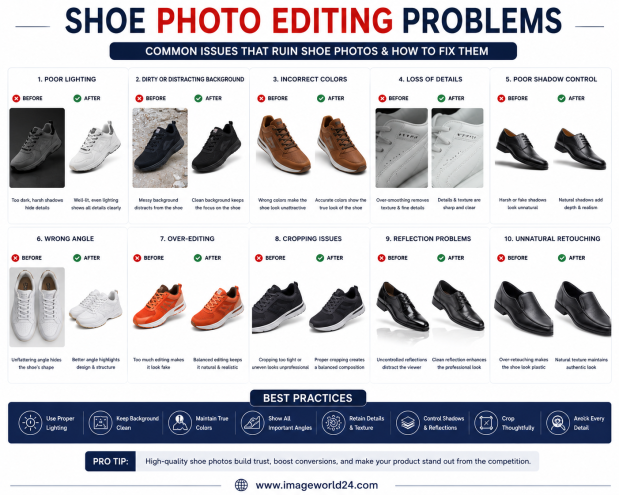
Shoe Photo Editing Problems and How to Fix Them Professional shoe photography is essential for attracting customers and increasing online sales. However, poor editing can make even premium footwear look dull, unrealistic, or low quality. In this guide, we'll explain the most common shoe photo editing problems and how professional Photoshop editing helps create clean, realistic, and high-converting product images for eCommerce.
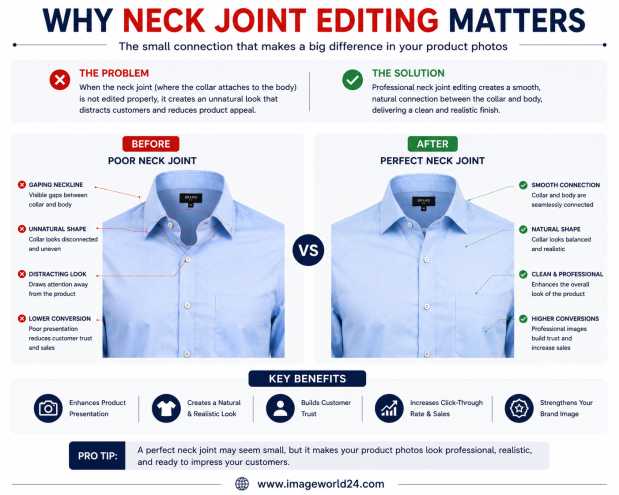
Why Neck Joint Editing Matters for Clothing Product Images Neck Joint Editing is a vital part of Ghost Mannequin photo editing that gives clothing products a realistic, three-dimensional appearance. Without proper neck joint editing, garments can look incomplete, hollow, and unprofessional. Learn why Neck Joint Editing is essential for fashion eCommerce and how it helps improve customer trust and online sales.
ImageWorld24 provides high-quality stock images, professional photo editing, custom visuals, and creative media solutions to help businesses and creators grow with premium visual content.
Call: +8801920933383
Mail: workimageworld24@gmail.com
Location: Dhaka, Bangladesh