
How to Remove Background Like a Professional: A Complete Step-by-Step Guide (2026)


Background removal is much more than simply deleting unwanted areas from an image. It helps create clean, distraction-free visuals that focus entirely on your subject.
Professional background removal is essential for:
High-quality product images increase customer confidence and often improve conversion rates.
Professional editors use a variety of software depending on the complexity of the image.
The industry-standard software for professional background removal.
Best for:
Perfect for beginners and quick editing.
Best for:
Great for social media graphics and simple background removal.
An excellent browser-based solution for quick edits.
The better the original image, the better the final result.
Use:
Different images require different selection methods.
Examples:
Professional editors usually rely on the Pen Tool for products because it creates the cleanest edges.
Zoom in while selecting.
Pay extra attention to:
Precision is what separates professionals from beginners.
Rough edges make edited images look fake.
Use edge refinement techniques to smooth borders while maintaining natural details.
Hair, fur, and transparent materials require special masking techniques.
After creating a perfect selection:
Professional editors always inspect their work closely.
Look for:
Correct every small imperfection before exporting.
Many beginners make these errors:
Avoiding these mistakes instantly improves image quality.
Choose the correct format depending on your needs.
PNG
JPEG
PSD
TIFF
Professional background removal requires time, experience, and attention to detail.
Businesses often outsource image editing because it offers:
This allows companies to focus on growing their business while experts handle image editing.
At ImageWorld24, we specialize in high-quality photo editing services for businesses around the world.
Our services include:
We combine experienced editors, advanced Photoshop techniques, and strict quality control to deliver clean, professional images with fast turnaround times.
Whether you need one image or thousands, our team is ready to help.
Professional background removal is one of the most valuable image editing skills for modern businesses. Clean, high-quality images improve brand credibility, attract more customers, and increase sales.
While automated tools can handle simple edits, professional manual editing ensures the highest level of accuracy, especially for products with complex edges, transparent materials, or fine details.
If you're looking for flawless, pixel-perfect background removal, working with experienced professionals is the best investment for your business.
Adobe Photoshop remains the most powerful and accurate software for professional background removal.
AI tools work well for simple images, but manual editing is still the best option for complex products, hair, jewelry, and transparent objects.
PNG is ideal for transparent backgrounds, while JPEG is suitable for white-background product images.
Simple images can take a few minutes, while complex images requiring manual clipping and masking may take longer depending on the level of detail.
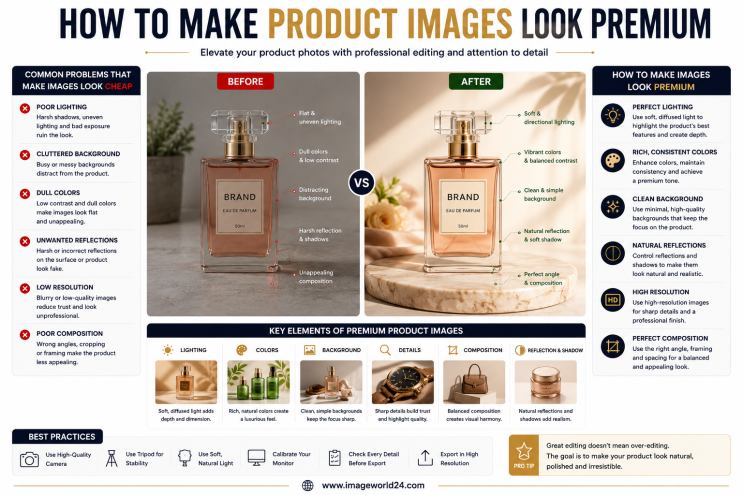
How to Make Product Images Look Premium Premium product images help businesses build trust, attract more customers, and increase online sales. Whether you're selling on Amazon, Shopify, Etsy, eBay, or your own eCommerce website, professional image editing can transform ordinary product photos into luxury-quality visuals. In this guide, you'll learn the best techniques to make product images look premium and stand out in today's competitive online marketplace.

Food Product Image Editing Tips for Better eCommerce Sales High-quality food photography is one of the most effective ways to attract customers and increase online sales. However, poor editing can make food look dull, unappetizing, and unrealistic. In this guide, you'll discover professional food product image editing tips that help restaurants, food brands, grocery stores, and eCommerce businesses create mouth-watering product images that convert visitors into customers.
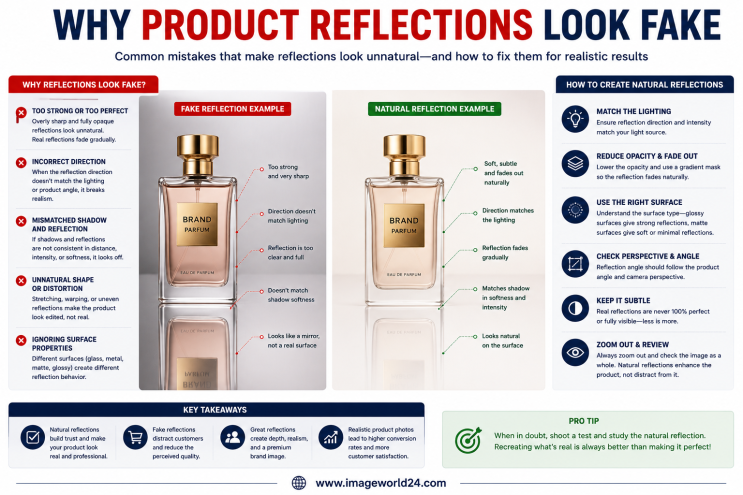
Why Product Reflections Look Fake (And How to Fix Them) Product reflection effects can make product photos look premium, but when done incorrectly, they often appear artificial and reduce customer trust. In this guide, you'll learn why product reflections look fake, the most common reflection editing mistakes, and how professional Photoshop retouching creates natural, realistic reflections for high-quality eCommerce product images.

Furniture Background Removal Challenges and Professional Solutions Furniture photography requires precise background removal to showcase products professionally. However, large sizes, intricate edges, shadows, reflections, and complex designs make furniture one of the most difficult product categories to edit. Learn about the biggest furniture background removal challenges and how professional Photoshop editing creates clean, realistic, and marketplace-ready images.
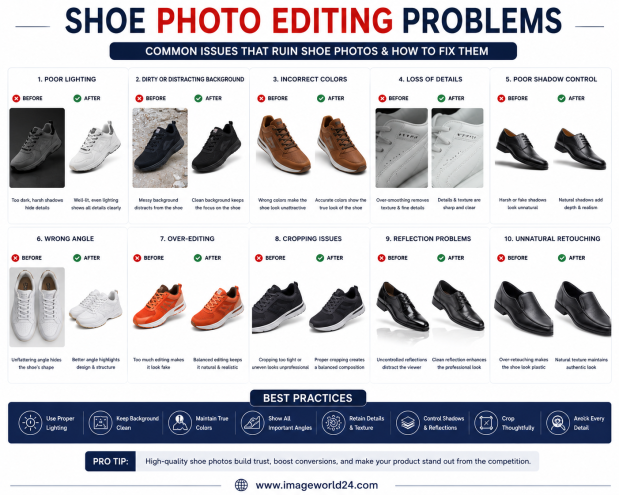
Shoe Photo Editing Problems and How to Fix Them Professional shoe photography is essential for attracting customers and increasing online sales. However, poor editing can make even premium footwear look dull, unrealistic, or low quality. In this guide, we'll explain the most common shoe photo editing problems and how professional Photoshop editing helps create clean, realistic, and high-converting product images for eCommerce.
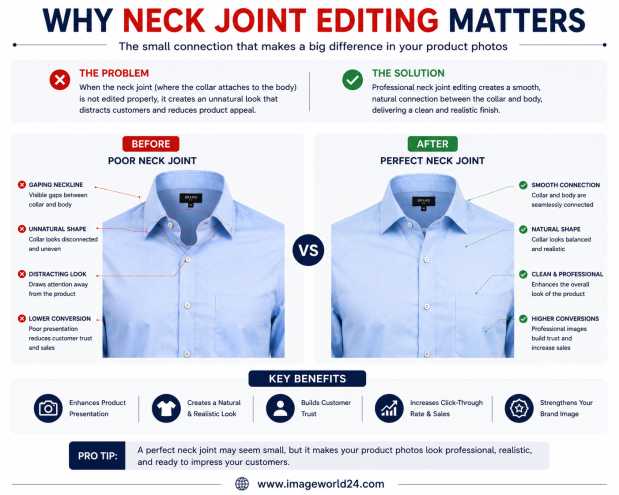
Why Neck Joint Editing Matters for Clothing Product Images Neck Joint Editing is a vital part of Ghost Mannequin photo editing that gives clothing products a realistic, three-dimensional appearance. Without proper neck joint editing, garments can look incomplete, hollow, and unprofessional. Learn why Neck Joint Editing is essential for fashion eCommerce and how it helps improve customer trust and online sales.
ImageWorld24 provides high-quality stock images, professional photo editing, custom visuals, and creative media solutions to help businesses and creators grow with premium visual content.
Call: +8801920933383
Mail: workimageworld24@gmail.com
Location: Dhaka, Bangladesh