
Shopify Product Image Mistakes to Avoid

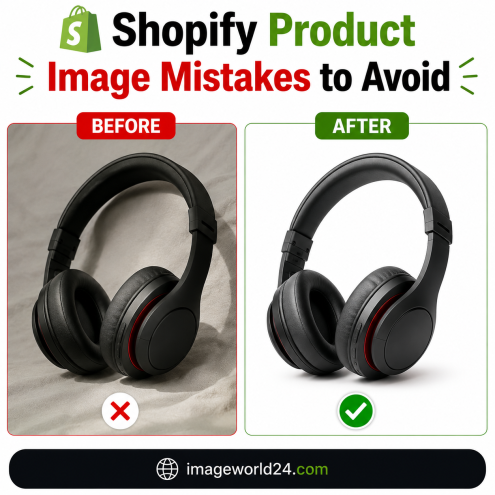
Running a successful Shopify store requires more than great products and competitive pricing. Your product images play a major role in influencing customer decisions.
When visitors land on your Shopify store, your product photos create the first impression. If your images look unprofessional, blurry, or inconsistent, potential customers may leave your website before even reading the product description.
Professional product photography and image editing help build trust, improve user experience, and increase conversion rates.
Let's explore the most common Shopify product image mistakes and learn how to avoid them.
One of the biggest mistakes Shopify store owners make is uploading low-quality product images.
Blurry or pixelated photos make products look cheap and reduce customer confidence.
Always use high-resolution images that remain sharp when customers zoom in.
Professional image enhancement ensures:
Busy or distracting backgrounds take attention away from the product.
Customers should immediately focus on the item you're selling.
Professional Background Removal Service helps create:
A clean background makes your Shopify store look more professional.
Many Shopify stores use different backgrounds, lighting, image sizes, and editing styles.
This creates an unorganized shopping experience.
Maintain consistency by ensuring every product image has:
A consistent store builds stronger brand identity.
Customers expect product colors to match reality.
If colors look different online, customers may request refunds or leave negative reviews.
Professional Color Correction Service provides:
Accurate colors improve customer satisfaction.
Products without shadows often appear unrealistic.
Flat images reduce the premium feel of your products.
Professional Shadow Creation Service adds:
Realistic shadows create depth and improve product presentation.
Improper cropping can hide important product details or leave excessive empty space.
Professional editors ensure:
Proper cropping improves the overall shopping experience.
Automatic background removal tools often leave jagged edges around products.
This is especially noticeable on:
Professional Clipping Path Service creates:
Manual editing produces much better results than automatic tools.
Customers cannot touch products online.
They rely entirely on product images.
Uploading only one image reduces buyer confidence.
Include:
Multiple product photos improve customer trust.
Many Shopify store owners optimize product descriptions but ignore image SEO.
Image SEO helps improve Google visibility.
Optimize every image with:
Proper image optimization improves both SEO and page speed.
Large image files slow down Shopify stores.
Slow websites lead to:
Optimize images without reducing quality.
Professional optimization includes:
Fast-loading images improve both SEO and customer experience.
Professional editing improves every aspect of your Shopify product images.
Services include:
These services help products appear clean, professional, and trustworthy.
Professionally edited images help your business by:
Customers are more likely to purchase products when images look professional and accurately represent the product.
At ImageWorld24, we provide professional Photoshop editing services for Shopify stores, Amazon sellers, Etsy shops, eCommerce businesses, photographers, and online brands.
Our services include:
Every image is manually edited to ensure the highest level of quality and accuracy.
Your Shopify product images are one of the most valuable assets of your online store. Poor-quality photos can reduce trust, lower conversions, and negatively impact sales.
By avoiding common image mistakes and investing in professional product image editing, you can create visually appealing product listings that improve customer confidence and strengthen your brand.
Professional image editing is not just about making products look better—it's about creating a better shopping experience that leads to more sales and long-term business growth.
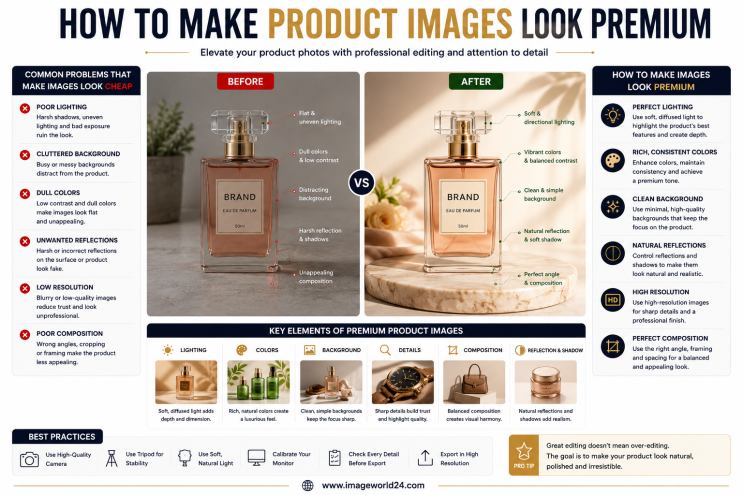
How to Make Product Images Look Premium Premium product images help businesses build trust, attract more customers, and increase online sales. Whether you're selling on Amazon, Shopify, Etsy, eBay, or your own eCommerce website, professional image editing can transform ordinary product photos into luxury-quality visuals. In this guide, you'll learn the best techniques to make product images look premium and stand out in today's competitive online marketplace.
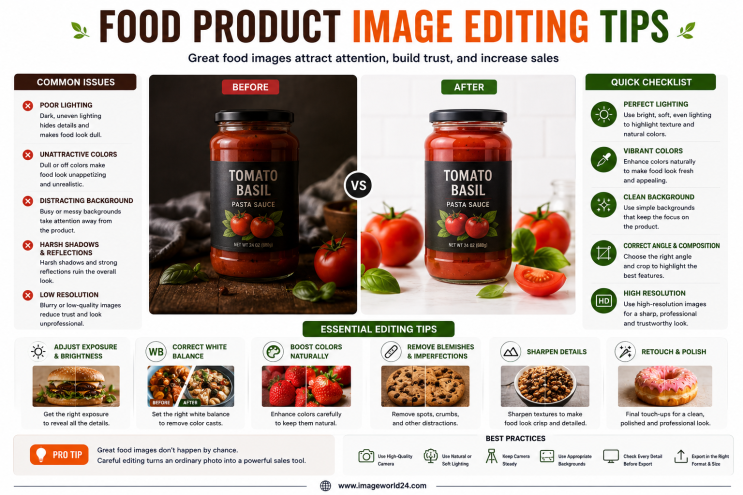
Food Product Image Editing Tips for Better eCommerce Sales High-quality food photography is one of the most effective ways to attract customers and increase online sales. However, poor editing can make food look dull, unappetizing, and unrealistic. In this guide, you'll discover professional food product image editing tips that help restaurants, food brands, grocery stores, and eCommerce businesses create mouth-watering product images that convert visitors into customers.
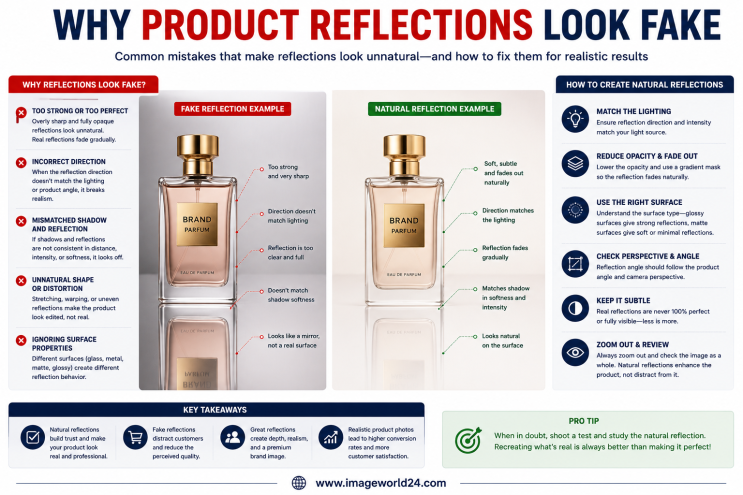
Why Product Reflections Look Fake (And How to Fix Them) Product reflection effects can make product photos look premium, but when done incorrectly, they often appear artificial and reduce customer trust. In this guide, you'll learn why product reflections look fake, the most common reflection editing mistakes, and how professional Photoshop retouching creates natural, realistic reflections for high-quality eCommerce product images.

Furniture Background Removal Challenges and Professional Solutions Furniture photography requires precise background removal to showcase products professionally. However, large sizes, intricate edges, shadows, reflections, and complex designs make furniture one of the most difficult product categories to edit. Learn about the biggest furniture background removal challenges and how professional Photoshop editing creates clean, realistic, and marketplace-ready images.
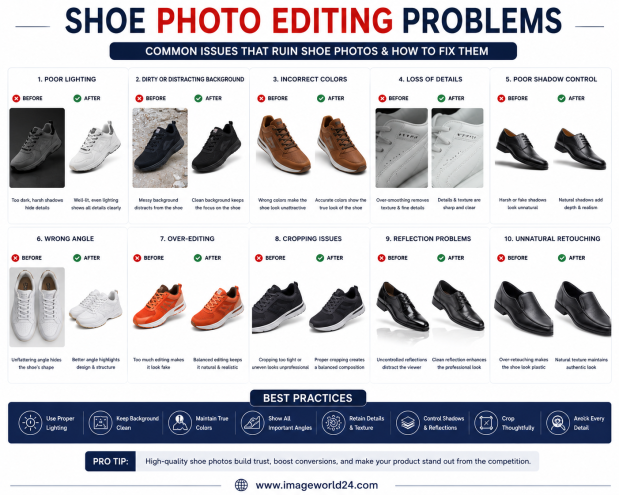
Shoe Photo Editing Problems and How to Fix Them Professional shoe photography is essential for attracting customers and increasing online sales. However, poor editing can make even premium footwear look dull, unrealistic, or low quality. In this guide, we'll explain the most common shoe photo editing problems and how professional Photoshop editing helps create clean, realistic, and high-converting product images for eCommerce.
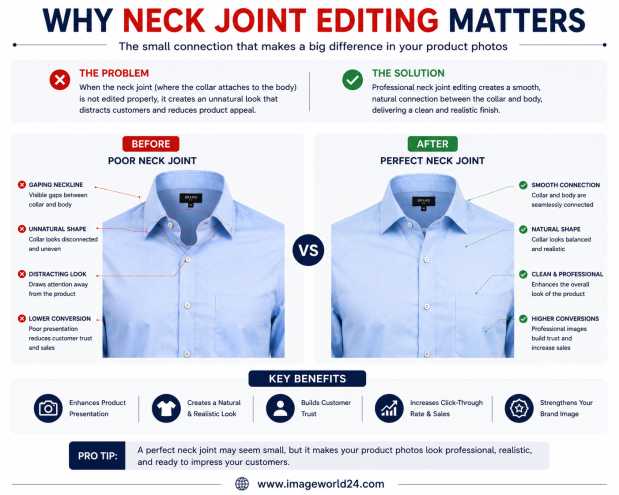
Why Neck Joint Editing Matters for Clothing Product Images Neck Joint Editing is a vital part of Ghost Mannequin photo editing that gives clothing products a realistic, three-dimensional appearance. Without proper neck joint editing, garments can look incomplete, hollow, and unprofessional. Learn why Neck Joint Editing is essential for fashion eCommerce and how it helps improve customer trust and online sales.
ImageWorld24 provides high-quality stock images, professional photo editing, custom visuals, and creative media solutions to help businesses and creators grow with premium visual content.
Call: +8801920933383
Mail: workimageworld24@gmail.com
Location: Dhaka, Bangladesh