
Why Manual Clipping Path Beats AI

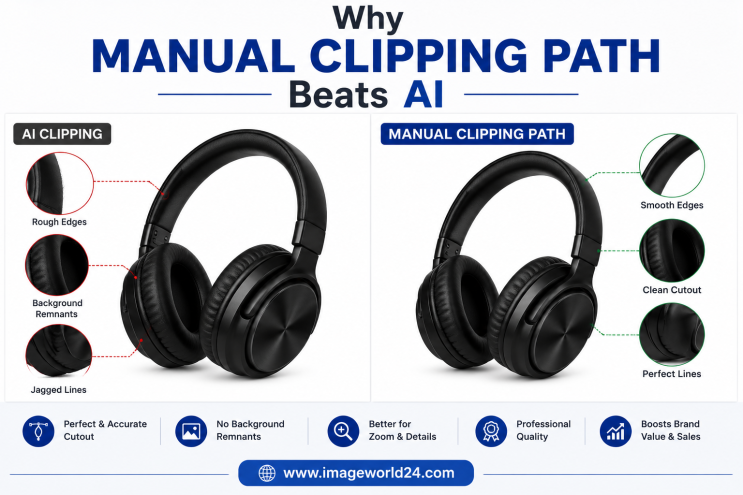
Artificial Intelligence (AI) has transformed the image editing industry by making background removal faster than ever. With just one click, AI tools can remove backgrounds in seconds.
While this technology is useful for quick edits, it often falls short when professional accuracy is required. Businesses selling products on Amazon, Shopify, Etsy, eBay, Walmart, or their own eCommerce websites need clean, consistent, and precise product images that meet marketplace standards.
This is where manual clipping path remains the superior choice.
Professional Photoshop editors carefully trace every edge of a product by hand, ensuring accuracy that AI simply cannot match.
In this article, we'll explain why manual clipping path continues to outperform AI and why it is the preferred solution for businesses that value quality.
A Manual Clipping Path is a professional Photoshop technique where an editor uses the Pen Tool to create a precise path around a product.
Instead of relying on automated detection, every curve, edge, and detail is manually selected.
This process produces clean, accurate, and high-quality cutouts suitable for professional use.
AI background removal uses machine learning algorithms to detect the main object in an image and automatically remove its background.
It is:
However, AI often struggles with complex products and fine details.
One of the biggest differences is edge quality.
AI often creates:
Manual clipping path creates:
Professional-quality edges immediately improve the appearance of product images.
AI performs reasonably well on simple objects.
However, it struggles with products such as:
Professional editors carefully trace every small detail manually.
AI tools often produce different results for similar images.
Manual editing ensures:
Consistency is especially important for online stores with hundreds of products.
Professional marketplaces require clean product images.
Manual clipping path creates marketplace-ready images for:
Clean images improve customer confidence and enhance the shopping experience.
AI frequently removes small product elements such as:
Manual clipping path preserves every important detail.
After background removal, products often require:
Professional clipping path creates clean edges that allow shadows to blend naturally.
Poor AI cutouts often make shadows look unrealistic.
Manual clipping path works seamlessly with other Photoshop services such as:
Professional workflows produce significantly higher-quality results.
Although AI technology continues to improve, it still produces several common issues.
Product outlines appear jagged.
Fine elements disappear during automatic selection.
Visible white outlines remain around products.
AI sometimes removes part of the product instead of the background.
AI struggles with:
Professional editors use advanced masking techniques for these challenging areas.
Manual clipping path is highly recommended for:
Complex product shapes require manual precision.
| Feature | Manual Clipping Path | AI Background Removal |
|---|---|---|
| Edge Quality | Excellent | Average |
| Accuracy | Very High | Moderate |
| Complex Objects | Excellent | Limited |
| Fine Details | Preserved | Often Lost |
| Consistency | Excellent | Varies |
| Marketplace Ready | Yes | Not Always |
| Human Quality Control | Yes | No |
| Best for Professional Use | Yes | Basic Editing |
Professional manual editing helps businesses:
These benefits contribute to a stronger online presence and better customer experience.
At ImageWorld24, we specialize in 100% Manual Clipping Path Services for businesses worldwide.
Our services include:
Every image is manually edited by experienced Photoshop professionals to ensure the highest level of precision, consistency, and quality.
AI background removal has made image editing faster, but speed should never come at the expense of quality. For businesses that depend on professional product images, manual clipping path remains the gold standard.
It delivers cleaner edges, preserves fine details, ensures consistent results, and produces marketplace-ready images that build customer trust and improve conversions.
If you want your products to look polished, professional, and ready for Amazon, Shopify, Etsy, eBay, or your own eCommerce store, investing in a Manual Clipping Path Service is the smartest choice. Professional editing not only enhances image quality but also strengthens your brand and creates a better shopping experience for your customers.
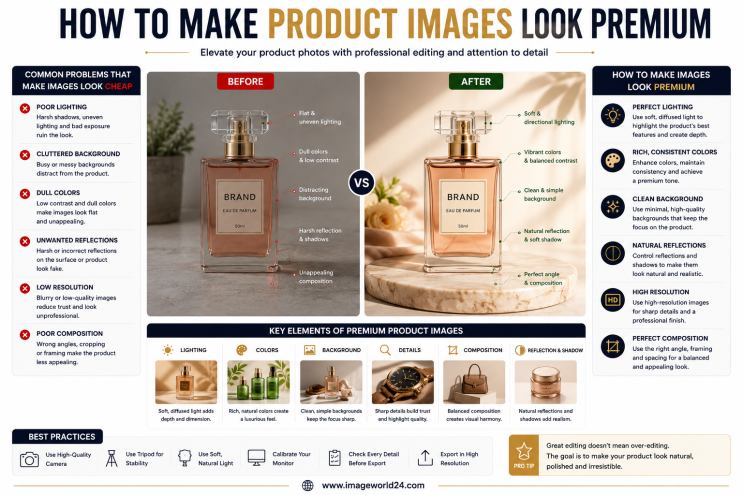
How to Make Product Images Look Premium Premium product images help businesses build trust, attract more customers, and increase online sales. Whether you're selling on Amazon, Shopify, Etsy, eBay, or your own eCommerce website, professional image editing can transform ordinary product photos into luxury-quality visuals. In this guide, you'll learn the best techniques to make product images look premium and stand out in today's competitive online marketplace.
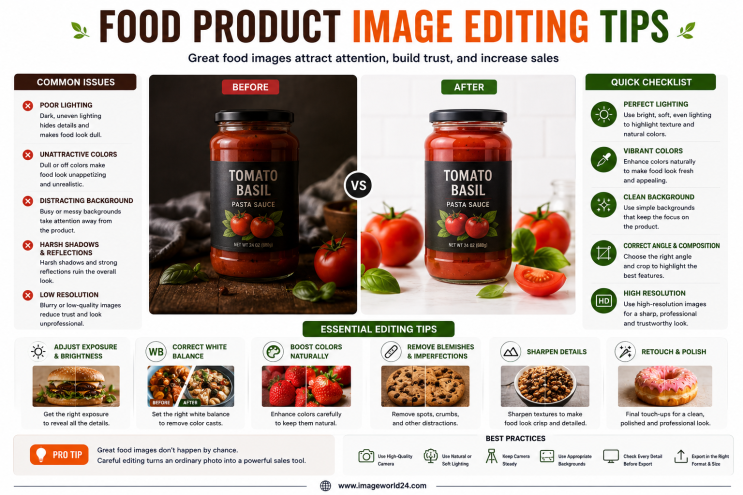
Food Product Image Editing Tips for Better eCommerce Sales High-quality food photography is one of the most effective ways to attract customers and increase online sales. However, poor editing can make food look dull, unappetizing, and unrealistic. In this guide, you'll discover professional food product image editing tips that help restaurants, food brands, grocery stores, and eCommerce businesses create mouth-watering product images that convert visitors into customers.
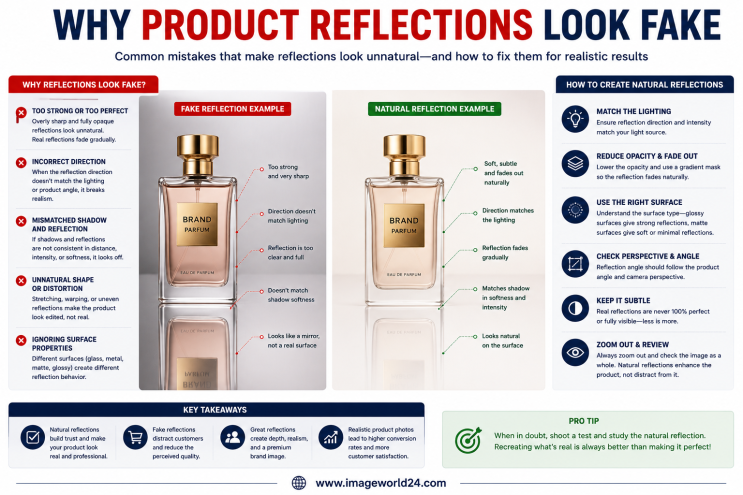
Why Product Reflections Look Fake (And How to Fix Them) Product reflection effects can make product photos look premium, but when done incorrectly, they often appear artificial and reduce customer trust. In this guide, you'll learn why product reflections look fake, the most common reflection editing mistakes, and how professional Photoshop retouching creates natural, realistic reflections for high-quality eCommerce product images.

Furniture Background Removal Challenges and Professional Solutions Furniture photography requires precise background removal to showcase products professionally. However, large sizes, intricate edges, shadows, reflections, and complex designs make furniture one of the most difficult product categories to edit. Learn about the biggest furniture background removal challenges and how professional Photoshop editing creates clean, realistic, and marketplace-ready images.
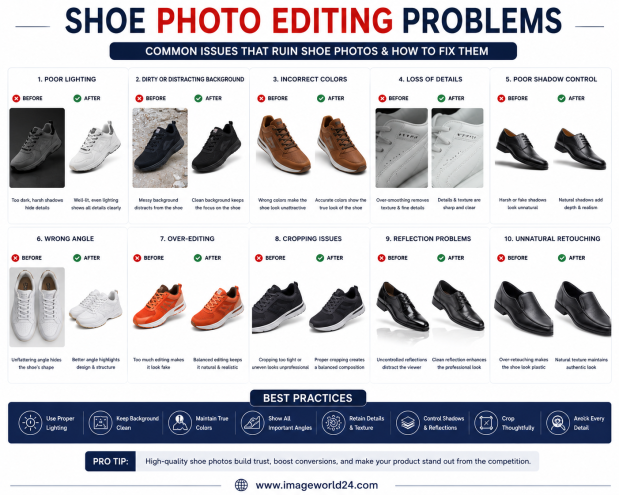
Shoe Photo Editing Problems and How to Fix Them Professional shoe photography is essential for attracting customers and increasing online sales. However, poor editing can make even premium footwear look dull, unrealistic, or low quality. In this guide, we'll explain the most common shoe photo editing problems and how professional Photoshop editing helps create clean, realistic, and high-converting product images for eCommerce.
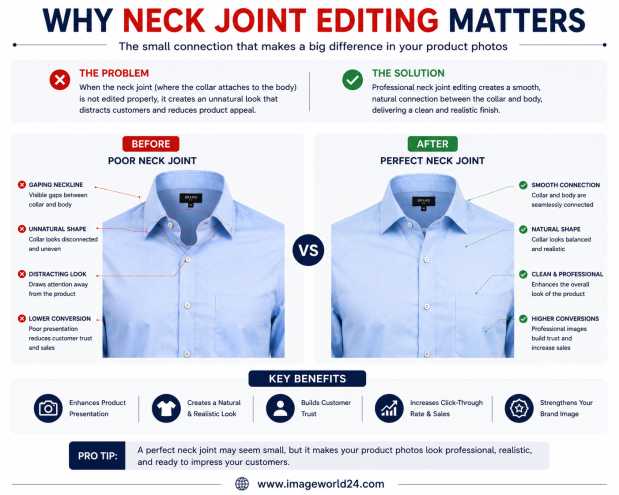
Why Neck Joint Editing Matters for Clothing Product Images Neck Joint Editing is a vital part of Ghost Mannequin photo editing that gives clothing products a realistic, three-dimensional appearance. Without proper neck joint editing, garments can look incomplete, hollow, and unprofessional. Learn why Neck Joint Editing is essential for fashion eCommerce and how it helps improve customer trust and online sales.

ImageWorld24 provides high-quality stock images, professional photo editing, custom visuals, and creative media solutions to help businesses and creators grow with premium visual content.
Call: +8801920933383
Mail: workimageworld24@gmail.com
Location: Dhaka, Bangladesh