
Why Neck Joint Editing Matters for Clothing Product Images

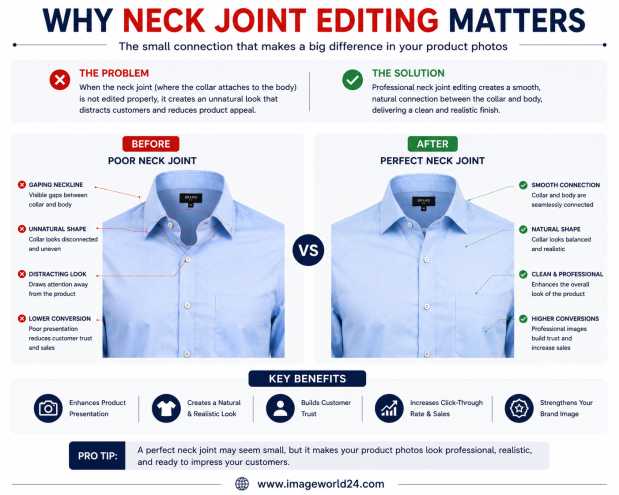
In today's competitive fashion eCommerce industry, product images play a major role in attracting customers and increasing conversions. Since online shoppers cannot physically touch or try on clothing, they rely entirely on product photos to evaluate the fit, style, and quality of each garment.
Whether you're selling apparel on Amazon, Shopify, Etsy, eBay, Walmart, or your own online fashion store, presenting your clothing professionally is essential.
One of the most overlooked yet important editing techniques is Neck Joint Editing. It is a crucial step in Ghost Mannequin Editing, helping clothing maintain its natural shape after the mannequin has been removed.
Without proper Neck Joint Editing, garments often look incomplete and unrealistic, which can reduce customer confidence and negatively impact sales.
Neck Joint Editing is a professional Photoshop technique used to recreate the inside neck or collar area after removing the mannequin from clothing photographs.
During a clothing photoshoot, garments are placed on a mannequin to maintain their natural shape. Once the mannequin is removed in Photoshop, the inside collar becomes invisible.
Professional editors combine multiple images and carefully reconstruct the hidden neckline, creating a clean and natural three-dimensional appearance.
Without Neck Joint Editing, clothing appears flat and hollow.
Adding the inside collar restores depth and gives garments a realistic appearance.
Customers can better understand how the clothing will look when worn.
Professional product images immediately create a stronger first impression.
A properly edited neck joint makes clothing look clean, polished, and ready for premium fashion catalogs.
Customers notice image quality.
When clothing images appear realistic and professionally edited, buyers feel more confident about purchasing from your store.
Better trust often leads to higher conversion rates.
Neck Joint Editing helps display important garment details, including:
These details help customers evaluate product quality before purchasing.
Consistency is essential for fashion brands.
Professional Neck Joint Editing ensures every clothing image follows the same style, making your online store look organized and trustworthy.
Neck Joint Editing is commonly used for:
Any garment photographed on a mannequin can benefit from Neck Joint Editing.
One of the most common mistakes is leaving an empty hole where the mannequin was removed.
This immediately makes the clothing look unfinished.
Professionally reconstruct the inside collar using additional photographs.
Poor editing often creates uneven or crooked collars.
Align both sides of the neckline carefully to maintain symmetry.
Using incorrect source images can result in visible texture differences around the collar.
Match the fabric texture, lighting, and color perfectly for a seamless appearance.
Bad editing sometimes leaves obvious cut marks around the neck area.
Blend all edges naturally so the editing becomes invisible.
The inside collar should match the rest of the garment.
Differences in brightness or color make the edit obvious.
Apply professional Color Correction after Neck Joint Editing.
AI-powered editing tools can remove mannequins, but they often fail to rebuild the hidden collar area accurately.
Common AI problems include:
Professional Photoshop editors manually rebuild the neckline, producing far more realistic results.
Neck Joint Editing is usually combined with:
Together, these services create premium-quality clothing images ready for eCommerce.
Professional Neck Joint Editing helps businesses:
These benefits contribute to a more professional online store and better sales performance.
At ImageWorld24, we provide professional Neck Joint Editing Services for clothing brands, photographers, apparel manufacturers, and online retailers around the world.
Our services include:
Every image is manually edited by experienced Photoshop professionals to ensure realistic garment shapes, seamless neck reconstruction, accurate colors, and premium-quality results.
Neck Joint Editing may seem like a small detail, but it has a significant impact on the overall quality of clothing product images. Without it, garments can appear hollow, unfinished, and unprofessional, reducing customer confidence and making your online store look less credible.
Professional Neck Joint Editing restores the hidden collar area, preserves the garment's natural shape, and creates the clean, three-dimensional appearance expected by today's online shoppers.
Whether you're selling apparel on Amazon, Shopify, Etsy, eBay, or your own fashion website, investing in professional Neck Joint Editing helps showcase your products more effectively, strengthens your brand image, and improves your chances of increasing online sales.
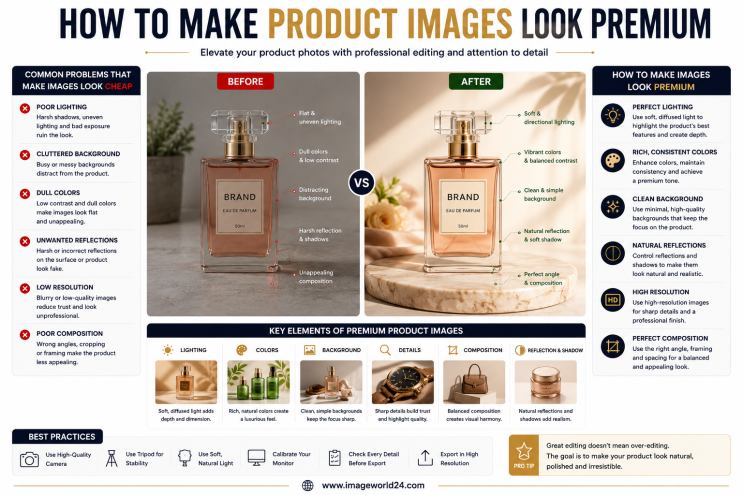
How to Make Product Images Look Premium Premium product images help businesses build trust, attract more customers, and increase online sales. Whether you're selling on Amazon, Shopify, Etsy, eBay, or your own eCommerce website, professional image editing can transform ordinary product photos into luxury-quality visuals. In this guide, you'll learn the best techniques to make product images look premium and stand out in today's competitive online marketplace.
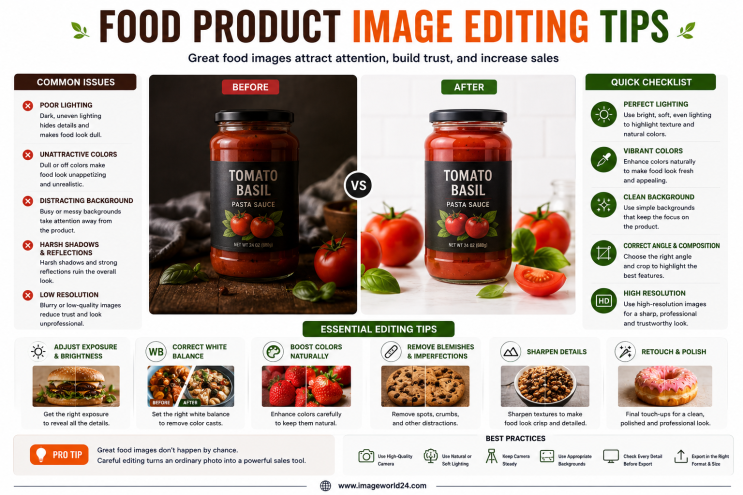
Food Product Image Editing Tips for Better eCommerce Sales High-quality food photography is one of the most effective ways to attract customers and increase online sales. However, poor editing can make food look dull, unappetizing, and unrealistic. In this guide, you'll discover professional food product image editing tips that help restaurants, food brands, grocery stores, and eCommerce businesses create mouth-watering product images that convert visitors into customers.
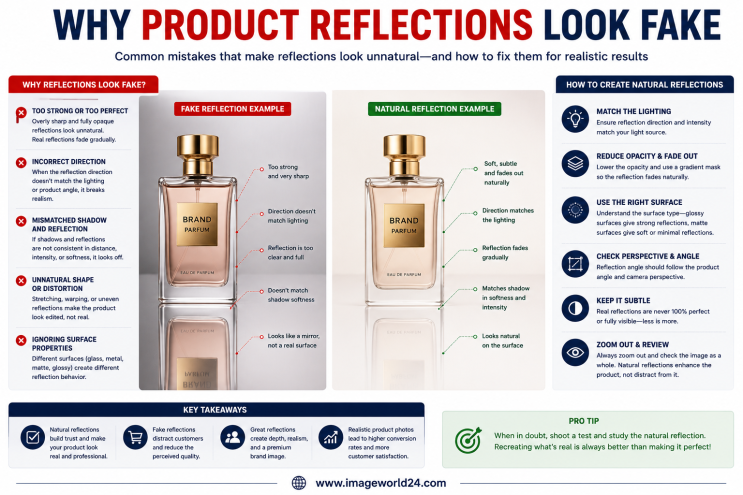
Why Product Reflections Look Fake (And How to Fix Them) Product reflection effects can make product photos look premium, but when done incorrectly, they often appear artificial and reduce customer trust. In this guide, you'll learn why product reflections look fake, the most common reflection editing mistakes, and how professional Photoshop retouching creates natural, realistic reflections for high-quality eCommerce product images.

Furniture Background Removal Challenges and Professional Solutions Furniture photography requires precise background removal to showcase products professionally. However, large sizes, intricate edges, shadows, reflections, and complex designs make furniture one of the most difficult product categories to edit. Learn about the biggest furniture background removal challenges and how professional Photoshop editing creates clean, realistic, and marketplace-ready images.
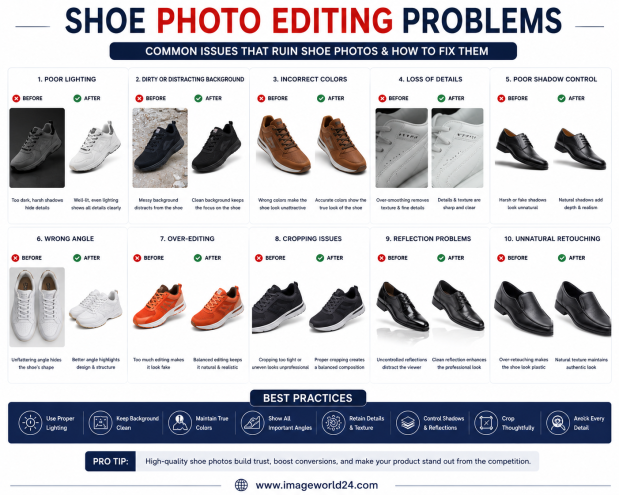
Shoe Photo Editing Problems and How to Fix Them Professional shoe photography is essential for attracting customers and increasing online sales. However, poor editing can make even premium footwear look dull, unrealistic, or low quality. In this guide, we'll explain the most common shoe photo editing problems and how professional Photoshop editing helps create clean, realistic, and high-converting product images for eCommerce.
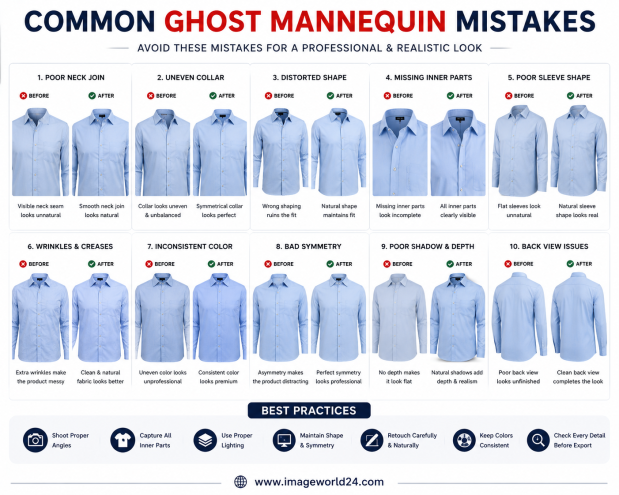
Common Ghost Mannequin Mistakes and How to Avoid Them Ghost Mannequin Editing is a popular technique used in fashion eCommerce to create clean, professional clothing images. However, poor editing can make garments look distorted, unrealistic, or unprofessional. In this guide, we'll discuss the most common Ghost Mannequin mistakes and explain how professional editing helps create flawless, marketplace-ready apparel images.
ImageWorld24 provides high-quality stock images, professional photo editing, custom visuals, and creative media solutions to help businesses and creators grow with premium visual content.
Call: +8801920933383
Mail: workimageworld24@gmail.com
Location: Dhaka, Bangladesh